Email preheader text, and how to write it
By Danish Mohammed. 7 min read
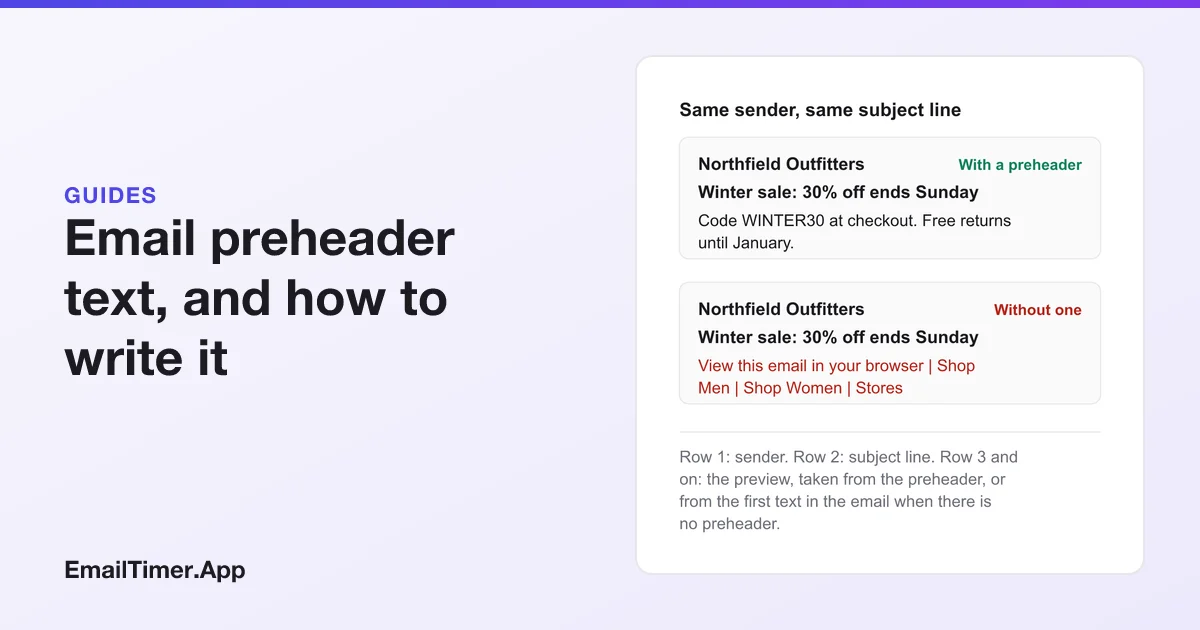
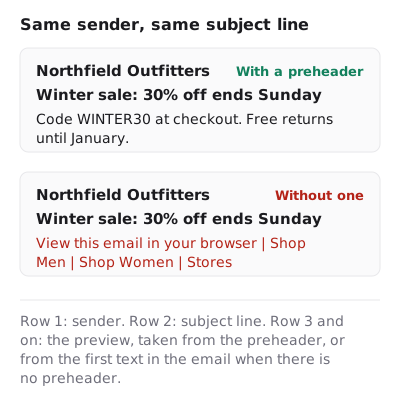
An email preheader is the short line of text an inbox shows after the sender and subject line, before anyone opens the message. You set it with a line of text placed first in the email’s HTML. If you leave it out, the inbox takes whatever text comes first instead, which is often “View this email in your browser”. Write it as the subject line’s second sentence.
This guide covers where that preview line comes from, the HTML that sets it, how it differs from the subject line, and what belongs in it when the email also carries a countdown timer.
What is a preheader in email?
The preheader, also called preview text, is the first text in the body of an email. Inboxes show a slice of it in the message list, next to or under the subject line, so it is the second thing a reader sees after the subject.
Apple’s own guide to Mail on iPad describes the list as showing “the first two lines of the email”, and says the reader can go to Settings, Mail, Preview and “choose up to five lines”. That one sentence explains most of what a preheader is. The inbox does not read a special field. It reads the start of the email.
Where does the inbox get preview text?
There are three cases, and the email’s HTML decides which one you get.
| What the top of the email holds | What the preview shows | What to do |
|---|---|---|
| A preheader as the first text | Your preheader, then whatever text follows it if the preheader is short | Write the preheader, and add filler if it is short |
| No preheader, a text header first | The view in browser link, the navigation, a legal line | Add a preheader |
| No preheader, an image first | Whatever text comes next, which varies by inbox | Add a preheader and test it |
The middle row is the usual accident. A template that opens with “View this email in your browser | Shop Men | Shop Women | Stores” spends the preview line on navigation, which tells the reader nothing about why the email is worth opening.
The third row matters for emails that open with a big banner or a countdown image. An image has no text of its own except its alt text, and inboxes do not agree on what they show in that case. Put a preheader in, and send a test to the inboxes your list uses before you trust what you see in your own.
Email preheader vs subject line: what is the difference?
The subject line is a header field, and every inbox shows it. The preheader is ordinary body text that inboxes choose to preview, so it can be cut short, shown on a second line, or not shown at all if the reader sets Apple Mail’s preview to zero lines.
| Subject line | Preheader | |
|---|---|---|
| Where it lives | The email’s Subject header | The first text in the HTML body |
| Always shown in the list | Yes | No: the reader and the inbox decide how much |
| Can be hidden in the opened email | No | Yes |
| Named in the FTC’s rule on deceptive subject lines | Yes | No, but it sits beside the subject and is read with it |
| Job | Say what the email is | Add the next most useful fact |
Because the two sit side by side, a preheader that repeats the subject wastes the line. The FTC’s CAN-SPAM compliance guide tells senders “Don’t use deceptive subject lines” and states that “the subject line must accurately reflect the content of the message.” A preheader that promises something the email does not have breaks the same trust, even though the rule names the subject line.
How do you add a preheader to an email?
Many sending platforms have a Preview text or Preheader box next to the subject field. Fill it in and the platform writes the hidden text into the top of the HTML for you. Check the sent email anyway, because some templates already carry a visible header line that ends up in the preview straight after yours.
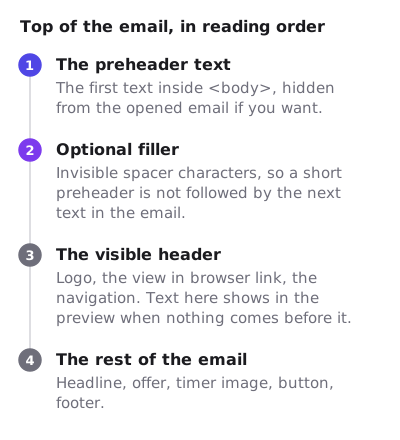
If you write the HTML yourself, the preheader goes first inside <body>, before the logo and the view in browser link:
<body>
  <div style="display:none;max-height:0;overflow:hidden;mso-hide:all;">
    Code WINTER30 at checkout. Free returns until January.
  </div>
  <!-- the visible header, logo and view in browser link start here -->
The display:none and the properties after it each hide the text a different way, so it is in the preview but not in the opened email. Some senders leave it visible instead, as a small line above the logo, which does not depend on any inbox honoring the hiding styles.
Stop the preview running into the next text
If your preheader is shorter than the space a wide screen gives it, the inbox keeps reading. Apple’s two lines are filled with the preheader and then the next text in the email, which is usually the view in browser link. The common fix is filler: a run of invisible spacer characters, such as ‌ repeated, placed inside the hidden block after the preheader. The inbox spends the rest of the line on characters that show as blank space.
Filler is optional. A preheader long enough to fill two lines on a laptop does the same job with words.
How long should a preheader be?
No inbox publishes a character limit, and the space depends on the screen, the font and the reader’s own setting: Apple lets them pick anything up to five lines. So write for the narrowest case. Put the point in the first few words, and treat everything after that as a bonus for readers on wider screens.
A useful test is to read the subject and the first six or seven words of the preheader together. If those two alone tell someone what the email offers and why now, the length is right.
What should a preheader say?
Treat it as the subject line’s second sentence. Some patterns that work:
- The detail the subject left out. Subject: “Winter sale: 30% off ends Sunday”. Preheader: “Code WINTER30 at checkout. Free returns until January.”
- The answer to the obvious question. Subject: “Your order has shipped”. Preheader: “Arriving Thursday by 8pm. Track it in one tap.”
- The date, in words. Subject: “Registration closes this week”. Preheader: “Book by Friday 11:59pm ET to keep the early rate.”
- What the reader gets from opening. Subject: “Welcome to the club”. Preheader: “Your 15% code is inside, plus how points work.”
And some to avoid: repeating the subject, “Having trouble viewing this email?”, a line that only makes sense once the email is open, and a deadline that is not real.
Preheaders for emails with a countdown timer
A countdown timer in an email is an image, drawn at the moment the email opens, so it can show the real time left. The preheader is text, set at send time, so it cannot count down. That splits the work between them.
Put the deadline in the preheader as a fixed date and time, with a time zone: “Ends Sunday at midnight ET”. It is the version every reader sees, including the ones whose inbox blocks images, and it is true for as long as the email exists. The timer then shows how long is left for the person reading it now. The HTML for an email countdown timer shows how to give that image alt text that carries the same date, so a blocked image still says it, and accessible countdown timers covers the screen reader side.
If you want to see the pairing in a draft before you build a campaign, the free countdown timer generator makes a timer image with no account, for 500 opens (1,000 when you sign in). Flash sale emails shows the same split in a full campaign.
Check the preheader before you send
- Send a test to yourself in every inbox your list uses most. Read the message list, not the opened email.
- Look at the preview on a phone in portrait. That is the narrowest it gets.
- Confirm nothing after your preheader leaks into the preview, such as the view in browser link.
- Read the subject and preheader together out loud. If they repeat each other, rewrite the preheader.
- If the email is a sale or an event, check that the date in the preheader matches the date in the email and the time the timer counts to.
Google’s sender guidelines ask every sender to keep spam rates reported in Postmaster Tools below 0.3% and to send only to people who opted in. A preheader that sets the right expectation before the open is one small way to keep readers from reaching for the spam button after it.
Questions and answers
Is preheader text the same as preview text?
Yes. Platforms use both names for the same thing: the first text in the email body, which the inbox shows next to or under the subject line.
What happens if I do not set a preheader?
The inbox previews whatever text comes first in the email. In many templates that is the view in browser link or the navigation, which spends the line on words that do not sell the email.
Should the preheader be visible in the opened email?
Either works. A hidden preheader keeps the design clean; a visible one is a small line above the logo that needs no hiding styles. Pick one and test it.
Can the preheader repeat the subject line?
It can, but it wastes the second line a reader sees. Use it for the next most useful fact: a code, a date, a delivery time.
Can a preheader include a countdown?
No. Preheader text is fixed when the email is sent, so it cannot change at open. Write the deadline as a date and time with a time zone, and let a timer image in the email show the time left.
Sources
Related
Put a countdown in the campaign you are writing now
The free plan covers 5,000 opens a month with no card. Starter is $19 a month for 250,000.