Email click-through rate, calculated and explained
By Danish Mohammed. 6 min read
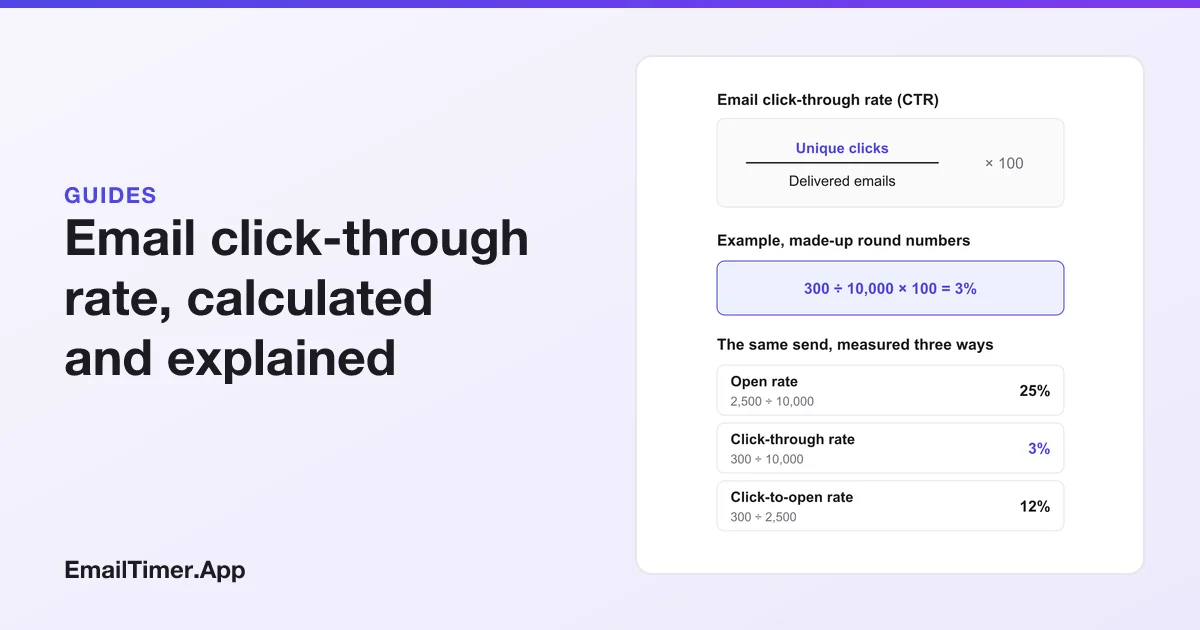
Email click-through rate (CTR) is the share of delivered emails in which at least one tracked link was clicked: unique clicks divided by delivered emails, times 100. Unlike open rate, it does not depend on a tracking image loading. Its weak spot is the click itself, which security scanners can produce before any person sees the message.
The name is the first trap. Platforms do not agree on what “click-through rate” means, and the same words can mean clicks over delivered on one report and clicks over opens on another. Below are the formula as the platforms define it, a worked example, the mechanism behind a click, and what to check before you compare two numbers. The platform pages quoted were read on 29 October 2026.
How do you calculate email click-through rate?
Click-through rate = unique clicks ÷ delivered emails × 100, where delivered emails = sent − bounced.
The platforms’ own words:
- Mailchimp’s click rate is “The percentage of successfully delivered emails that registered a click.”
- Klaviyo’s click rate is “the unique number of clicks divided by the number of delivered emails.”
- Campaign Monitor’s click rate is “the number of recipients who clicked is divided by the number of emails delivered.”
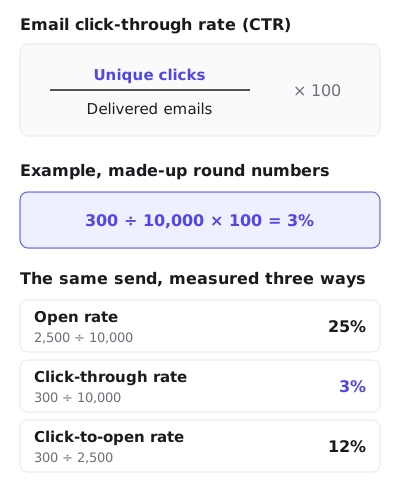
A worked example
Made-up round numbers, to show the arithmetic:
| Step | Number |
|---|---|
| Emails sent | 10,200 |
| Bounced | 200 |
| Delivered | 10,000 |
| Unique clicks (recipients who clicked at least once) | 300 |
| Total clicks (every click, repeats included) | 420 |
| Click-through rate (300 ÷ 10,000 × 100) | 3% |
Use unique clicks, not total clicks. Mailchimp’s report lists total clicks separately, as “The total number of times tracked links were clicked by recipients”, which counts the same person clicking three links three times. Dividing 420 by 10,000 here would give 4.2%, a number that rises when one keen reader clicks everything.
Click rate, click-through rate or click-to-open rate?
These names overlap, and the overlap is not a matter of taste. Klaviyo’s glossary is the clearest example. It defines click rate for email as “unique clicks divided by delivered messages”, and then says that “In Klaviyo email reporting, click-through rate (also called click-to-open rate) is unique clicks divided by unique opens.” So in one platform, “click-through rate” is the metric that other writers call click-to-open rate.
| Name you see | Meaning in the platforms cited here | Denominator |
|---|---|---|
| Click rate | Unique clicks ÷ delivered | Delivered emails |
| Click-through rate (CTR) | Usually the same as click rate | Delivered emails, but check |
| Click-to-open rate (CTOR) | Unique clicks ÷ unique opens | Opens |
| Clicks per unique opens (Mailchimp) | Recipients who opened and clicked ÷ recipients who opened | Opens |
The safe habit is to ignore the label and read the denominator. If it is delivered emails, the number is what this page calls click-through rate. If it is opens, it is a click-to-open rate, and it carries every problem the open count has. Email open rate explains those problems, including why Apple Mail Privacy Protection inflates opens.
How is a click recorded?
A click is a redirect. Mailchimp describes it step by step: when click tracking is on, “Mailchimp adds tracking information to each click-through URL. Each time a recipient clicks a link in the email, the tracking information redirects them through Mailchimp’s servers”, and “That redirect through our server is logged in your email report as a click.”
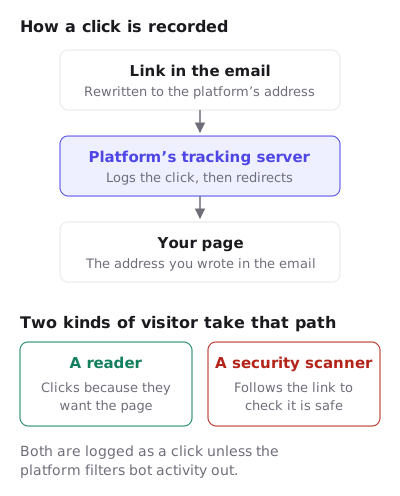
So a click needs no image to load, and a reader with images switched off can still click. It is also where the click count goes wrong.
Why bot clicks inflate click-through rate
Mail security systems open links to check them. Mailchimp’s guide to bot clicks puts it plainly: “Before delivery: Corporate firewalls scan links for malware”, and “these programs click your links to scan for threats, often before any human sees your email.” Then: “Each of these automated safety checks registers as a click in your analytics.”
Telling them apart is the platform’s job, because it sees the requests and you see a total. Mailchimp says its filtering combines digital fingerprinting, IP intelligence and behavioral analysis, and that the IP checks flag clicks from corporate security systems, bot networks, office buildings and data centers.
Mailchimp’s report shows whether bot filtering is on, and its help page recommends that you “exclude bot activity from your reports for more accurate open and click metrics.” Klaviyo’s trend report says it “excludes bot clicks from its click counts and click rates.” Machine activity reaches clicks from the open side too: Mailchimp’s open tracking page says Apple’s Mail Privacy Protection “can falsely inflate open and click metrics”. If your platform offers a filter, read the filtered number, and do not compare a filtered rate with an unfiltered one from last year.
What affects email click-through rate?
The honest answer is anything that changes whether a reader finds a reason to click and can do it easily. Each of these is a fact about the email you can check, not a promised lift:
| Factor | What to check |
|---|---|
| One clear action | Is there a single main link, repeated, rather than ten competing ones? |
| Link text | Does the text say where the link goes? “See the sale prices” says more than “Click here”. |
| Tap size on a phone | Is the button large enough to hit with a thumb, with space around it? |
| Images off | Is the main link live text or a coded button, not only a linked picture? |
| Audience | Did the email go to people who asked for this kind of message? |
| The page behind it | A click is only worth counting if the page answers what the link promised. |
The images-off row matters for any email that puts its offer in a picture. A linked image with images blocked is a blank box, so the main link should also be text. The HTML for an email countdown timer shows a timer wrapped in a link with alt text that carries the deadline, and explains why click tracking must rewrite the link but never the image address.
A timer is one way to give a deadline a visible reason to click now. If you want to test one, the free countdown timer generator makes a timer without an account, good for 500 opens, or 1,000 when you sign in. Measure it the way this page describes: the same list, a random split, and click-through rate on delivered emails rather than opens.
Questions and answers
What is the formula for email click-through rate?
Unique clicks divided by delivered emails, times 100. Delivered is sent minus bounced. With 300 unique clicks on 10,000 delivered, the rate is 3%.
Is click rate the same as click-through rate?
On most reports, yes: both divide by delivered emails. But Klaviyo’s glossary uses “click-through rate” for unique clicks divided by unique opens, which is what others call click-to-open rate. Check the denominator.
Why do I have clicks from people who never opened the email?
Two common causes. A reader with images off can click without the tracking image loading, and Mailchimp then counts the click as an open too. And a security scanner can follow links without anyone reading.
Should I use unique or total clicks?
Unique clicks for the rate, so each recipient counts once. Total clicks are useful for seeing which links people chose, but they rise when one person clicks many times.
Does a click from a bot count?
In raw counts, yes. A scanner following a tracked link passes through the same redirect a person does. Platforms that filter bot activity, such as Mailchimp and Klaviyo, take those clicks out of the filtered rate.
Sources
- About Open and Click Rates (Mailchimp Help), read on 29 October 2026
- About Email Reports (Mailchimp Help), read on 29 October 2026
- Use Click Tracking in Emails (Mailchimp Help), read on 29 October 2026
- How to Detect Bot Clicks in Email Marketing (Mailchimp Resources, undated), read on 29 October 2026
- Advertising glossary (Klaviyo Help Center), read on 29 October 2026
- How to use the email campaigns trend report (Klaviyo Help Center), read on 29 October 2026
- Open and click rates (Campaign Monitor Help), read on 29 October 2026
Related
Put a countdown in the campaign you are writing now
The free plan covers 5,000 opens a month with no card. Starter is $19 a month for 250,000.