Email automation: the flows worth building, and the rules they run on
By Danish Mohammed. 14 min read
Email automation is sending email by rule instead of by hand: something a person does, a date on their record, a stretch of silence or a changed field starts a flow, and the flow decides which email they get, when, and when to stop. You build each flow once, and every subscriber goes through it on their own clock.
That makes automated emails a different job from a newsletter, which you write and send to everyone at one moment. Below: the parts every flow is made of, which flows to build first, email automation examples by business type, what can change per reader, how to measure a flow, and the rules. Most flows have a page of their own, linked from the table further down.
What is email automation?
An automated email is any message your platform sends because a rule fired, not because someone pressed send. Two families run through the same machinery, and the law treats them very differently.
| Marketing automation emails | Transactional automated emails | |
|---|---|---|
| Examples | Welcome series, abandoned cart, birthday, re-engagement | Order confirmation, shipping confirmation, password reset, a notice that a subscription’s terms are changing |
| What the email is for | Selling or promoting | Completing or administering something the person already agreed to |
| Consent and unsubscribe | An unsubscribe in every email, and consent first in the UK and EU | Mostly exempt, as long as no promotion is mixed in |
The right column is automation too, and usually the first a store runs, because the checkout sends an order confirmation whether or not anyone planned a flow. A broadcast is the opposite case: one send, one moment, the whole list. The drip campaign guide sets the two side by side.
How does an automated email flow work?
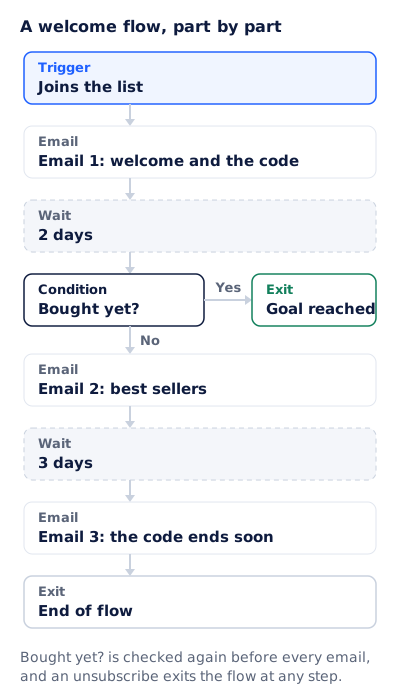
Every flow, on every platform, is built from the same parts, whatever the editor calls them: a trigger, emails, waits, conditions and exits. Here is a welcome flow, part by part.
Triggers: an event, a date, inactivity or a field change
The trigger decides who enters the flow and when. There are four kinds, and every flow on this page starts with one of them.
| Trigger type | What starts the flow | Flows that use it |
|---|---|---|
| An event | Something the person did: joined the list, left a checkout, placed an order, registered for a webinar | Welcome series, abandoned cart, order and shipping confirmation, event reminder |
| A date | A date on their record comes round: a birthday, a trial end, a renewal | Birthday, trial ending, renewal reminder |
| Inactivity | Something stops happening: no click in 90 days, no order in a year | Re-engagement |
| A field change | A value on their record changes: a loyalty tier, a plan, a lifecycle stage | New loyalty tier, lifecycle stage moves |
Platforms name these differently. Klaviyo’s help center lists its flow triggers as added to list, added to segment, metric, date property, price drop and low inventory. A metric is an event, a date property is a date, and a segment can stand in for inactivity or a field change.
Inactivity is the trigger to define with care. Apple’s privacy page says Mail Privacy Protection “downloads remote content in the background by default”, so an Apple Mail reader can register an open without reading anything. Define “inactive” by clicks, orders or logins, never by opens.
Waits
A wait holds a person between steps: two days after the last email, or until a date, such as three days before their trial ends. It is measured from that person’s own entry, so a flow with a two day wait sends on a different calendar day for everyone in it.
Conditions
A condition splits or filters the flow: has this person bought, do they live in the UK, did they click the last email. What catches people out is when it is checked. Klaviyo’s documentation says of its own flows: “Metric-based trigger filters are only checked when an individual first enters the flow”, while profile filters are checked at entry and again before each action. A condition checked only at entry cannot notice a purchase made on day two.
Exits
An exit takes someone out before the last email. Four cover most flows:
- The goal. A purchase ends a cart flow. A first real use ends onboarding.
- An unsubscribe. It ends every marketing flow at once, not only the one the link was in.
- A higher priority flow. Someone who starts a trial during the newsletter welcome series should get one sequence, not both.
- The end. The last email sends and the flow is done.
Check how your platform does it. In Klaviyo, a person who fails a profile filter before an action skips that action and carries on, so “exit when they buy” is a filter on every remaining step.
A welcome flow you can copy
Trigger:   joins the list
Email 1:   at once. Welcome and the code (15% off, ends 7 days after joining)
Wait:      2 days
Condition: bought yet?  Yes: exit, goal reached.  No: continue
Email 2:   best sellers, with the code repeated
Wait:      3 days
Condition: bought yet?  Yes: exit, goal reached.  No: continue
Email 3:   the code ends soon (sent on day 5, two days before it ends)
Exit:      end of flow
Always:    an unsubscribe exits the flow at any step
How often is too often? Timing and frequency caps
Timing belongs to each flow, and the table further down gives the usual one for each. The harder problem is overlap. A new subscriber can join the welcome series, leave a cart and get a back in stock alert on the same afternoon, and three flows that each look sensible send three emails. A frequency cap is a rule across flows: at most one marketing email to a person in a set window, with the rest skipped or held.
Klaviyo’s version is called Smart Sending. Its help center says that “by default, the email Smart Sending window is 16 hours”, and that “messages marked as transactional in Klaviyo are never skipped by Smart Sending.” Copy the second rule whatever platform you use: a cap applies to marketing email, never to a receipt or a shipping notice.
- Rank the flows. When two marketing flows want the same person on the same day, the higher one sends: a cart reminder outranks a welcome email about the brand.
- Cap marketing, not transactional. Start at one marketing email a day per person, then move it with your own unsubscribe and complaint numbers.
- Leave room after an order. Hold marketing flows for a few days after a purchase, so the confirmations are not buried.
- Decide what re-entry does. A countdown that restarts every time a shopper re-enters the cart flow is a clock nothing enforces, and fake countdown timers explains the problem.
Which automated emails should you build first?
Build in roughly the order a customer meets the flows, starting with the ones that fire whether you planned them or not.
- Order and shipping confirmation. Your checkout already sends them. Make them accurate first: customers go looking for these.
- Welcome series. Every new subscriber triggers it, while they still remember signing up.
- Abandoned cart, or onboarding for software. The person was one step from buying, or from using what they signed up for.
- Back in stock and the post-purchase follow-up. Both hang off requests and orders you already have.
- Dated flows: birthday, trial ending, renewal. Each fires rarely, but the date is known in advance.
- Re-engagement. Last, because it needs history: a person has to have been active before they can go quiet.
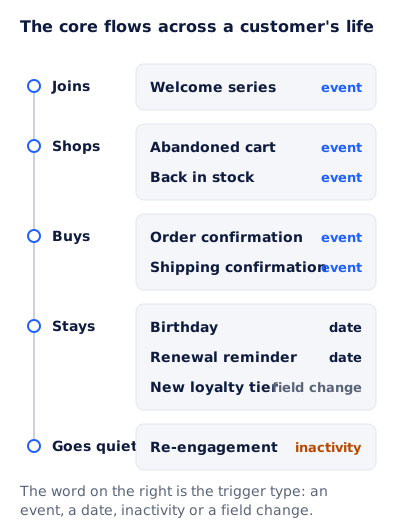
Every flow on the diagram, and a few more, with the trigger, the usual timing and the page that covers it:
| Flow | Trigger | Timing | The page that covers it |
|---|---|---|---|
| Welcome series | Joins the list or creates an account | The first email at once, then 2 to 4 more over 1 to 2 weeks | Welcome email, and email personalization for the name and code in it |
| Onboarding or nurture drip | Signs up or starts a trial | Paced to the goal, such as before day 14 of a 14 day trial | Drip campaign |
| Abandoned cart | Leaves a checkout after giving an email address | The first within a few hours, 2 or 3 in all over 2 to 3 days | Abandoned cart email, and dynamic email content for the product block |
| Order confirmation | Places an order | At once | Order confirmation email |
| Shipping confirmation | The parcel leaves the warehouse | When the carrier has it | Shipping confirmation email |
| Back in stock | An item they asked about returns | When the stock arrives | Back in stock emails |
| Event reminder | Registers for an event or webinar | A week, a day and an hour before | Event reminder email |
| Last chance | A deadline nears for people who have not acted | The final 24 hours or less | Last chance email |
| Trial ending and renewal | A date on the account | Some days before the date | Trial and renewal emails |
| Birthday | The date on the profile | On the day, or a few days before | Birthday email |
| New loyalty tier, or any segment entry | A field change puts them in a segment | When they enter it | Email segmentation |
| Lifecycle stage change | A field change, such as first-time buyer to repeat buyer | When the stage changes | Lifecycle email marketing |
| Re-engagement | No clicks for a set window | After 60 days to a year, by how often you send | Re-engagement email |
The timings are ranges to plan from, not standards: no regulator or mailbox provider publishes one, and your own buying cycle should move them.
Email automation examples by business type
The same parts build very different programs. These are patterns, not any one brand’s results.
Ecommerce. Welcome with a first-order code, abandoned cart, order and shipping confirmation, a review request after delivery, back in stock, a replenishment reminder timed to how long the product lasts, and re-engagement. The order is the trigger that matters most, because four of those flows hang off it.
Software. Onboarding toward the one action that predicts a user stays, a nudge when a key feature is still unused after a week, trial ending, payment failed, and renewal. The FTC’s list of transactional or relationship content includes a notice about “a change in the terms or features of a membership, subscription, account”, so a plain notice of that kind is not a marketing email. Add an upgrade pitch and the test in the rules section decides what it is.
Events. Registration confirmation, reminders before the start, a “starting now” email, and a replay afterwards. Attendance is the condition doing the work: the replay goes to people who registered and did not come.
Publishers and newsletters. A welcome series that sends the best of the archive, a nudge to set preferences, a renewal flow for paid readers, and a flow that asks quiet readers whether to stay. When the list is the product, that last flow matters more than any discount.
What can change per recipient inside an automated email?
An automated email is one template sent to people at different moments with different data. Four layers can change for each reader:
| Layer | Decided when | Example | Where it goes wrong |
|---|---|---|---|
| Merge fields | When the platform builds the email | First name, order number, the product left in the cart | An empty field prints a blank, so set a default |
| Dynamic blocks | When the platform builds the email | A UK delivery block for UK readers, a different hero for repeat buyers | Too many versions to proofread |
| Images drawn at open | When the mail client fetches the image | A countdown, a points balance, a name in the artwork | Some clients fetch early or keep a copy |
| Per-recipient deadlines | When the person entered the flow | A cart held for four hours, a code that ends seven days after joining | A deadline the store does not enforce |
Dynamic email content covers the blocks, and email personalization covers which of these are worth changing at all.
The last two rows are where automation and timing meet. A newsletter can say “ends Sunday at midnight” to everyone. A welcome flow cannot. Maya joined on Monday and Tom on Wednesday, so a code that ends seven days after joining ends on a different day for each, and the email has to say so.
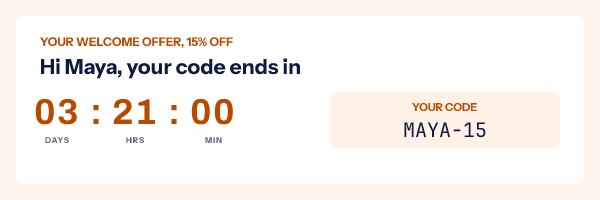
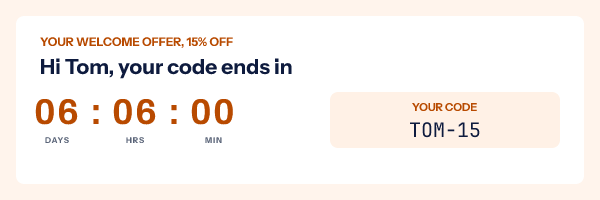
That picture is what EmailTimer.app draws. The image is rendered when the mail client fetches it, and each subscriber’s deadline, name and code come from a signed address minted for that person through the countdown timer API, on the Growth or Agency plan (pricing), so the clock matches the deadline your store enforces. Where the window should start at the reader’s first open instead, an evergreen countdown timer counts from that subscriber’s first fetch, with one catch: Mail Privacy Protection fetches at delivery, so for those Apple Mail readers the clock starts on arrival. Personalized images covers names, codes and points drawn into the artwork.
How do you measure an automated flow?
Measure each flow against the one thing it exists to do, then each step inside it.
- The goal rate. Of the people who entered, how many bought, activated or renewed before the flow ended. This says whether the flow works.
- Exits by reason. How many left on the goal, on an unsubscribe, to a higher priority flow, or at the end. When most reach the end, the flow is not converting or an exit is not firing.
- Unsubscribes and spam complaints per step. If one email carries most of the unsubscribes, that email is the problem. Google asks senders to “keep spam rates reported in Postmaster Tools below 0.10% and avoid ever reaching a spam rate of 0.30% or higher.”
- A holdout group. Keep a small random share of entrants out of the flow and compare their goal rate. Without one, a flow takes credit for purchases that would have happened anyway.
To A/B test, split one step at a time, such as the subject of email 2, and judge the versions by the goal rate rather than by clicks on that one email.
Leave opens out: because of Apple’s background downloads, Apple Mail readers can count as opened without reading. The email open rate guide covers what the number can still tell you.
The rules: consent, unsubscribe, and transactional vs commercial email
An automated marketing email is a marketing email. Automation changes one thing: a mistake repeats for everyone who enters the flow until somebody notices. What follows summarizes the regulators’ own guidance and is not legal advice.
In the US, CAN-SPAM covers commercial email. The FTC’s compliance guide lists what counts as transactional or relationship content instead, starting with content that “facilitates, completes, or confirms a commercial transaction that the recipient already has agreed to”, and it warns: “Keep in mind that the law views these categories narrowly.” A commercial email must include “your valid physical postal address” and a clear way to opt out, and the guide says “You must honor a recipient’s opt-out request within 10 business days.” For an email that mixes the two, 16 CFR 316.3(a)(2) makes it commercial if a reader of the subject line would conclude it is an ad, or if the transactional part “does not appear, in whole or in substantial part, at the beginning of the body of the message.”
In the UK, the ICO’s guidance on electronic mail marketing says you “must not send marketing emails or texts to individuals without specific consent”. The exception is the soft opt-in for existing customers who bought something similar, and only if you gave them a clear chance to opt out when you collected their details and in every message since. The rule covers individuals and sole traders; the ICO says “you can email or text any corporate body”, though data protection may still apply when the address names a person. Its guidance on service messages is stricter than the US test: a service message with marketing elements counts as direct marketing “even if that is not the main purpose of your message.”
In the EU, Article 13 of the ePrivacy Directive allows email for direct marketing only to subscribers “who have given their prior consent”, with the same kind of exception for a business’s “own similar products or services”, provided customers can object free of charge when their details are collected and in each message. Each member state writes it into its own law.
| Automated email | US (CAN-SPAM) | UK (PECR, ICO guidance) |
|---|---|---|
| Welcome, cart, birthday, re-engagement | Commercial: opt-out and postal address | Direct marketing: consent or the soft opt-in |
| Order or shipping confirmation, no promotion | Transactional | Service message |
| Order details first, a product row below, neutral subject | Transactional, under the 316.3(a)(2) test | Direct marketing |
Gmail’s bulk sender rules sit on top of the law. Google’s sender guidelines say that for senders of more than 5,000 messages a day to Gmail accounts, “marketing messages and subscribed messages must support one-click unsubscribe” and must “include a clearly visible unsubscribe link in the message body.” One-click means the two headers RFC 8058 defines: List-Unsubscribe with an HTTPS address, and List-Unsubscribe-Post: List-Unsubscribe=One-Click. The mailbox sends an HTTPS POST to that address, and both headers “MUST be covered by the signature”, the DKIM one. Google’s FAQ adds that “transactional messages are excluded from this requirement” and recommends honoring unsubscribe requests within 48 hours. The same bulk senders need DMARC, with the From domain aligned to the SPF or DKIM domain, which the SPF, DKIM and DMARC guide explains.
In a flow builder this comes down to two settings. An unsubscribe exits every marketing flow at once, not only the one it came from. And a transactional flow stays transactional: put the promotion in a separate marketing email, not in the receipt. The order confirmation email guide works through the mixed case.
Questions and answers
What is an example of email automation?
A welcome series. Someone joins your list, the first email goes out at once with whatever the sign-up form promised, and two or three more follow over the next week unless the person buys first.
What is the difference between email automation and email marketing?
Email marketing is the whole practice, including newsletters and campaigns sent to a list at one moment. Email automation is the part that runs on rules: each person gets an email when their own trigger fires.
Are automated emails transactional or marketing?
Either. An order or shipping confirmation is transactional, and a welcome, cart or birthday email is marketing. The difference decides whether consent and an unsubscribe link are required.
Do automated emails need an unsubscribe link?
Marketing ones do. CAN-SPAM requires an opt-out in commercial email, UK and EU law require a way to opt out of marketing, and Gmail requires one-click unsubscribe from bulk senders. A purely transactional email is exempt from most of that.
Which automated emails should I set up first?
Make the order and shipping confirmations accurate, then build a welcome series, then an abandoned cart flow, or onboarding for software. Dated flows and re-engagement come after.
Can an automated email show a different deadline to each person?
Yes, when the deadline comes from that person’s own trigger, such as the moment they joined or left a cart. The email needs an image or block made for that person, and the store has to enforce the same deadline.
Sources
- CAN-SPAM Act: A Compliance Guide for Business (Federal Trade Commission), read on 3 November 2026
- 16 CFR 316.3, Primary purpose (Legal Information Institute, Cornell Law School), read on 3 November 2026
- Electronic mail marketing (Information Commissioner's Office, UK), read on 3 November 2026
- Identify direct marketing (Information Commissioner's Office, UK), read on 3 November 2026
- Directive 2002/58/EC on privacy and electronic communications, Article 13 (EUR-Lex), read on 3 November 2026
- Email sender guidelines (Google Workspace Admin Help), read on 3 November 2026
- Email sender guidelines FAQ (Google Workspace Admin Help), read on 3 November 2026
- RFC 8058, Signaling One-Click Functionality for List Email Headers (IETF), read on 3 November 2026
- Mail Privacy Protection and Privacy (Apple Legal), read on 3 November 2026
- Understanding flow triggers and filters (Klaviyo Help Center), read on 3 November 2026
- Understanding Smart Sending in Klaviyo (Klaviyo Help Center), read on 3 November 2026
- Photo by Christopher Finklea on Pexels