

A year in review email is a December message that shows each customer what their own year with you looked like: how many orders, what they bought most, the points they earned. The strongest versions put those numbers in one picture drawn for that customer, so the recap reads as theirs rather than as your company’s annual report.
Most guides to the year in review email show screenshots of finished campaigns and stop there. This page covers the part they skip: how each customer’s numbers get into the picture, what to show someone whose year was one order, and the checks to run before the send. The picture itself is image personalization for email: one design, with each recipient’s values drawn into the pixels when they open it.
What is a year in review email?
There are two kinds, and they need different builds.
A brand recap tells everyone the same story: the products you launched, the store you opened, the charity total. One email, one set of images, sent to the whole list. Any email builder can do it.
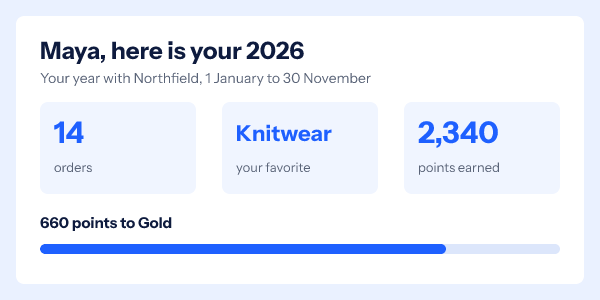
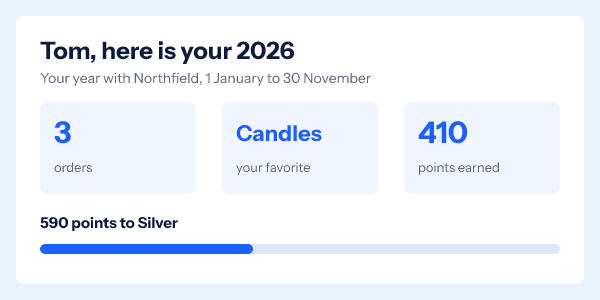
A customer recap tells each person their own story. Maya sees 14 orders and knitwear as her favorite. Tom sees three orders and candles. That needs per-customer data in the email, and that is where this page spends its time.
What stats belong in a customer year in review?
Three to five numbers. More than that and the picture turns into a spreadsheet at 600 pixels wide. Pick the ones a customer will recognize at a glance, because a recap that shows a number they cannot place reads as a mistake.
| Business | Stats worth drawing | Where the number comes from |
|---|---|---|
| Online store | Orders, favorite category, money saved with codes | Order history in the store platform |
| Subscription box | Boxes received, the most-rated item, months subscribed | Subscription and review records |
| Gym or studio | Classes attended, favorite class, longest streak | Booking system |
| Software product | Projects created, hours saved, the feature used most | Product analytics |
| Loyalty program | Points earned, current tier, points to the next tier | Loyalty ledger |
| Nonprofit | Total given, months of support, what it funded | Donor records |
The last column matters more than the middle one. Every number has to come out of a system you can export from, one row per customer, by the date you build the list. If a stat needs a data team to calculate, pick a simpler one. If you run a points program, the loyalty email page covers balance and tier images in depth, and the progress bar page covers the bar.
How do each customer’s numbers get into the image?
Through a recipient list. You export the year’s stats as a CSV with one row per customer, upload it, and get back one image address per row. Each address is signed, and it carries an opaque token rather than the numbers themselves, so no order count or name sits in a URL that a proxy logs. The values are looked up when the image is requested.
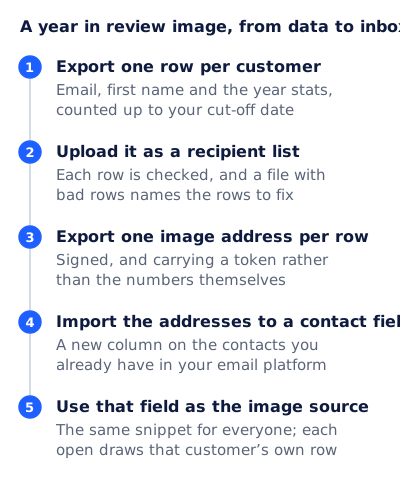
The CSV looks like this. email identifies the customer; every other column is a value, matched to the template’s variables by name:
email,first_name,orders,top_category,points,to_next,next_tier,progress
maya@example.com,Maya,14,Knitwear,2340,660,Gold,78
tom@example.com,Tom,3,Candles,410,590,Silver,41
ana@example.com,Ana,1,,,,,
A list can hold up to 500,000 rows, and a file with a few bad rows tells you which rows they are rather than failing the whole upload. Recipient lists and the API are on the Growth and Agency plans; pricing has the details. A team that prefers code can mint the same kind of addresses from the API instead, up to 10,000 in one call.
Then the addresses go back into your email platform as a contact field, a new column on the contacts you already have, and the image source is that field. In Klaviyo, profile personalization “generally begins with person”, so a property named yir_image is written {{ person.yir_image }}. Klaviyo also warns that tags “are case sensitive and must exactly match the property names they reference”. In Mailchimp it is an audience field and its merge tag, such as *|YIRIMAGE|*. The whole address lives in the field. Never put a merge tag inside an image address, because the signature covers the address and a value swapped in after signing breaks it. The Klaviyo guide shows the HTML block this goes in.

What do you show a customer with a thin year?
Something kind, and not a grid of zeros. A customer with one order and no favorite category should not get a tile reading “0 points earned”.
Each variable in the template declares what happens when its value is missing: draw a default, hide that layer, or hide the whole group it belongs to. In the design above, the three stat tiles form one group, and a missing favorite category hides all of them. A rule then shows a thank-you line instead.
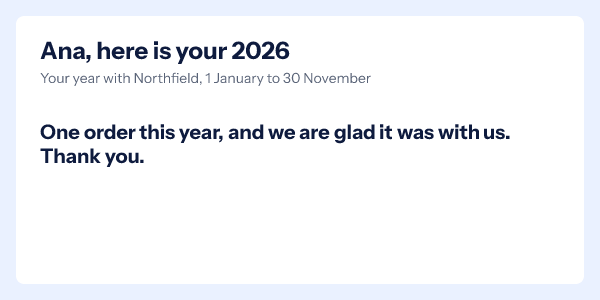
Decide where the line falls before you export. A practical split is three segments: customers with enough activity for the full recap, customers with one or two orders who get the thank-you version, and customers with no purchase this year who get no recap at all. A recap of nothing is a reminder that they left.
A year in review email template you can copy
This is the skeleton for the full recap, written for Klaviyo. Swap the tag syntax for your platform. The image carries the numbers; the live text repeats them, so the email still makes sense with images off.
Subject:    Maya, your 2026 with Northfield
Preheader:  14 orders, one favorite, and what is next

[Image: src = {{ person.yir_image }}
 alt = "Your 2026 with Northfield: {{ person.orders }} orders,
        favorite category {{ person.top_category }},
        {{ person.points }} points earned"]

Hi {{ first_name|default:'there' }},

Thank you for shopping with us this year. Your numbers are
counted from 1 January to 30 November.

[Button: See your points]

One line about next year: what is coming, or a thank-you offer
with its real end date.

Northfield, [postal address], [unsubscribe link]
Subject lines that work for a customer recap name the person or the year, and promise their own numbers rather than yours:
| Segment | Subject | Preheader |
|---|---|---|
| Full recap | Maya, your 2026 with Northfield | 14 orders, one favorite, and what is next |
| Full recap, loyalty program | Your year in points, Maya | 2,340 earned and 660 to Gold |
| One or two orders | Ana, thank you for 2026 | We are glad you found us this year |
| Brand recap, no personal data | Our 2026, and the part you played | What we made, shipped and fixed this year |
Two notes on the template. The alt text and the link around the image take merge tags freely, because neither is part of the signed address. And keep the alt text to what the picture says. The W3C’s guidance for informative images is that the text alternative should “convey the meaning or content that is displayed visually”, which for a recap is the numbers, not a description of the colors.
The thank-you segment can use the same image, since the template hides the tiles on its own, but give it its own email: a subject like “Ana, thank you for 2026” and live text without the stats. Mailchimp’s guidance on merge tags is a useful warning for the live text: without a default value, “the personalized spot appears blank” for a contact with no data in the field.
When should you send a year in review email?
Early December, with a data cut-off a few days before you build the list. Interest in the year in review email comes in a December rush, and the work has to be done before it, so the window is short.
| Date | Step |
|---|---|
| Mid November | Choose the stats, build the template, test it with the worst rows on your list |
| 30 November | Data cut-off. Export the rows, upload the list, export the addresses |
| 1 to 3 December | Import the addresses to a contact field, send a seed, check five real rows |
| First half of December | Send, before holiday shipping messages crowd the inbox |
Put the cut-off date in the picture (“1 January to 30 November”), so nobody wonders why a December order is missing.
Image caching barely matters for this email. Apple states that Protect Mail Activity “downloads remote content in the background by default”, so for those readers the image is fetched near delivery rather than at the read. A countdown would be affected by that. A year of stats does not change between delivery and opening, so the early fetch shows the same picture.
If you add a thank-you offer with an end date, a fixed-deadline countdown is the one piece that needs no customer data. A timer from the free countdown timer generator works for 500 opens without an account, and for 1,000 once you sign in and claim it. Holiday campaigns covers the December sends that follow the recap.
Checks before you send
| Check | Why |
|---|---|
| Compare ten random rows against the source system | A recap with a wrong number is worse than no recap |
| Open the image for your longest name and longest category | Truncation should cut cleanly, not run off the card |
| Open the image for a thin row | The thank-you version should show, not empty tiles |
| Send a seed and view the source | The image address in the email should be exactly the one in the contact field |
| Read the email with images off | The live text and alt text should carry the numbers |
For a customer whose name is missing or arrives in capitals, the birthday email template page covers the name handling in detail; the same transforms apply here.
Questions and answers
What should a year in review email include?
Three to five stats the customer will recognize, their name, the date range the numbers cover, a thank-you, and one clear next step. The stats should come from records you can export per customer.
Can I send a year in review email without per-customer data?
Yes, as a brand recap: the same story and images for everyone. It is simpler, and it is the right choice when you cannot export clean per-customer numbers in time.
What if a customer’s numbers are wrong?
Catch it before the send. Compare a sample of rows with the system they came from, fix the export, and upload again. A wrong number in a recap does more harm than leaving the recap out.
Does each customer need their own image address?
Yes. The address carries a token for that customer’s row, and the platform puts it in with a contact field. The snippet is the same for everyone; the field’s value differs.
Should a year in review email include a discount?
Only if you would have sent one anyway. The recap is the reason to open; an offer with a real end date can sit under it, but a recap that exists to carry a coupon reads like a sale email in disguise.
Sources
- Message personalization reference (Klaviyo Help Center), read on 4 November 2026
- Getting Started with Merge Tags (Mailchimp), read on 4 November 2026
- Mail Privacy Protection and Privacy (Apple Legal), read on 4 November 2026
- Informative Images (W3C Web Accessibility Initiative), read on 4 November 2026
- Photo by Karolina Grabowska (Kaboompics) on Pexels
- Photo by olia danilevich on Pexels
Related
Put a countdown in the campaign you are writing now
The free plan covers 5,000 opens a month with no card. Starter is $19 a month for 250,000.