Re-engagement email, how to win people back or let them go
By Danish Mohammed. 7 min read
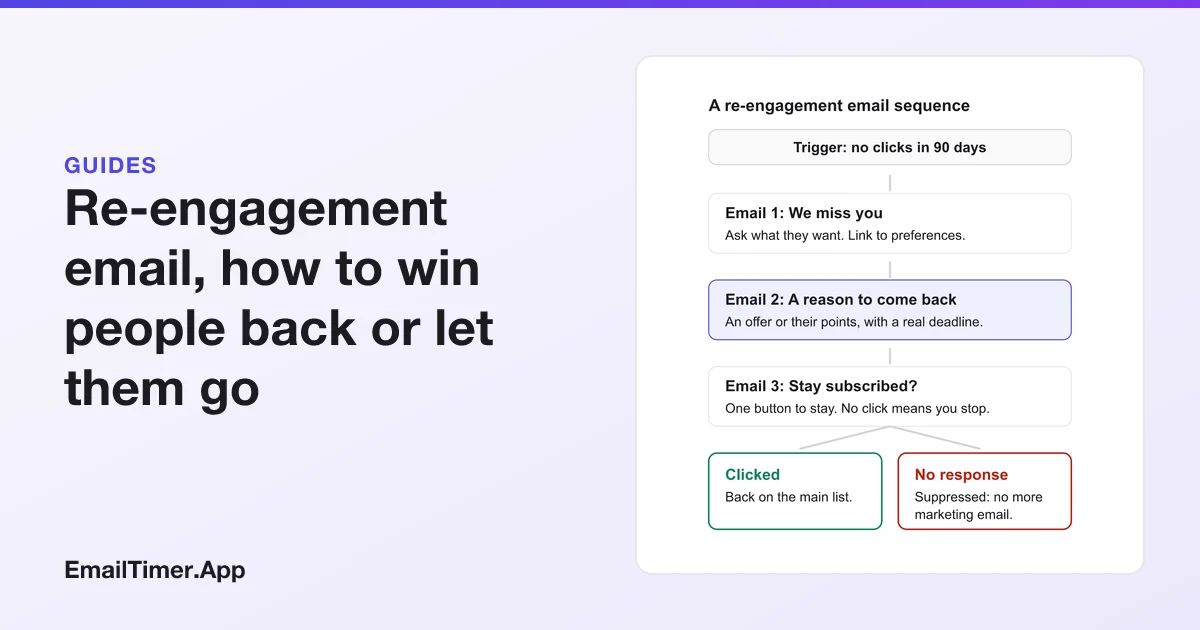
A re-engagement email is a message, or a short sequence of two or three, sent to subscribers who have stopped interacting with your email, to find out whether they still want it. It has two jobs, and both count as success: bring back the people who are still interested, and give everyone else a clear way out before you stop mailing them.
Most guides treat the second job as failure. Gmail and Yahoo do not. Both mailbox providers tell senders, in their own published guidance, to reconfirm or remove people who no longer read. This page covers who should get a re-engagement email, what to put in each message, how to define “inactive” when open rates are unreliable, and what to do with the people who never answer.
Why send a re-engagement email at all?
Because the mailbox providers judge you partly by how your recipients react, and people who never read your email are a cost rather than an audience.
Google’s sender guidelines say to “Consider unsubscribing recipients who don’t open or read your messages” and to “Periodically send messages to confirm that recipients want to stay subscribed.” Yahoo’s Sender Hub says the same in different words: “Consider sending a reconfirmation email to inactive subscribers periodically”, and it warns that “Sending email to users who are not reading them” will harm delivery metrics and reputation.
That reconfirmation message is the re-engagement email. It is not only a marketing idea. It is the list hygiene step both providers name.
There is a second reason. Google asks senders to “Keep spam rates reported in Postmaster Tools below 0.10% and avoid ever reaching a spam rate of 0.30% or higher.” A person who no longer recognizes your email may report it as spam rather than look for the unsubscribe link. Asking them first costs less than being reported.
Who counts as an inactive subscriber?
Pick a window that fits how often you send, and measure it with clicks, not opens.
Opens are the wrong signal now. Apple’s privacy page says Mail Privacy Protection “downloads remote content in the background by default”, so Apple Mail can register an open for someone who never looked at the message. Google states that it “doesn’t track open rates”, and adds that “Low open rates aren’t necessarily an accurate indicator of deliverability or spam classification issues.” An opens-based rule keeps sleeping Apple readers on your list for ever and can flag some active readers as gone.
| How often you send | A reasonable inactivity window | Signal to measure |
|---|---|---|
| Several times a week | 60 to 90 days with no click | Clicks, purchases, logins |
| Weekly | 90 to 120 days with no click | Clicks, purchases |
| Monthly | 6 months with no click | Clicks, purchases, replies |
| A few times a year | 12 months with no click | Any purchase or reply |
These windows are a starting point you should adjust to your own buying cycle. Neither Google nor Yahoo publishes a number of days, and Yahoo’s page says to “Monitor hard and soft bounces as well as inactive recipients” without setting one. A furniture brand whose customers buy every few years can wait longer than a daily deals list.
Bounces are separate. Google says to “Automatically unsubscribe recipients who have multiple bounced messages”, and Yahoo says to “Remove invalid recipients from your list promptly.” Those addresses do not get a re-engagement email. They come off the list.
What goes in a re-engagement email sequence?
Three emails are enough. Each has a different job, and the last one ends the conversation.
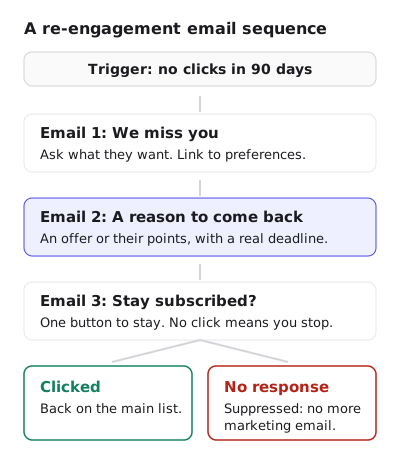
Email 1, the “we miss you” email. Ask what they want. Link to preferences, so a reader who gets too much email can choose less instead of leaving entirely. Keep it short, personal in tone, and free of discounts: you are asking a question, not selling.
Email 2, the win back email. Give a reason to come back: an offer, or their own loyalty points, with a real deadline. This is the only email in the sequence that should carry urgency, and only if the deadline is true. A code that expires, points that lapse, a membership week that ends.
Email 3, the reactivation email. One button to stay. No click means you stop. Say plainly what happens: “If you do not click, we will stop sending you marketing email.” Then do it.
The wording changes by business, but the order does not. Question first, reason second, decision last.
What a win back email can show
The strongest reason to return is usually something the reader already has. A points balance, a tier, or a reward they are close to is specific to them in a way a site-wide discount is not.
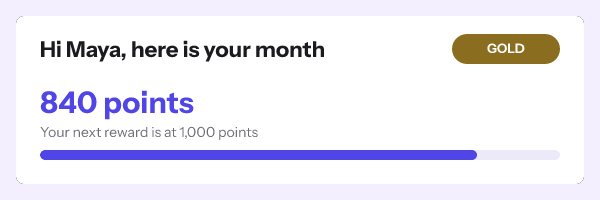
An image like this is drawn per reader at open time from values in their own signed address, which is minted from the API or a recipient list on the Growth and Agency plans. Personalized images covers the names, codes, points and progress bars it can draw. Email gamification goes further, with progress bars, status cards and streaks that work in every inbox.
Hydro Flask’s members week email uses the same idea for a loyalty push. Under the headline “Don’t leave rewards on the table” sits a Points Status card that reads 100, “Points to your next reward”, and then the reason to act now: “2x points gets you there faster through midnight.” It is shown as Hydro Flask sent it, with an EmailTimer.App countdown added at the foot of that card, where the copy already names a deadline.


What it does well for a win back email: the number is the reader’s own, the deadline is stated in words before any clock appears, and the double points are the reason the deadline exists. A countdown with nothing behind it would be the opposite. Fake countdown timers shows where the FTC draws that line.
What should you do with people who never respond?
Suppress them from marketing email. Do not delete the record if you need it for orders or legal reasons, but stop sending campaigns.
Some senders keep a “sunset” segment that gets one email a quarter. That is a judgment call, and a reasonable one for a business with long buying cycles. What is hard to defend is mailing them on the full schedule after they ignored a message asking whether they want to stay.
Two rules apply whatever you decide:
- Unsubscribes are not a re-engagement audience. The FTC’s CAN-SPAM guide says “You must honor a recipient’s opt-out request within 10 business days”, and Yahoo asks bulk senders to “Honor unsubscribes within 2 days”. Someone who unsubscribed does not get a “we miss you” email.
- Make leaving easy. Google requires senders of more than 5,000 messages a day to Gmail accounts to support one-click unsubscribe for marketing messages. A re-engagement email whose unsubscribe link is hard to find invites the spam button instead.
How to measure a re-engagement email campaign
Measure what the sequence was for, which is a cleaner list and some people back.
| Measure | What it tells you |
|---|---|
| Share of the inactive segment that clicked | How many people you won back |
| Share that unsubscribed or chose fewer emails | How many left on their own terms rather than by complaint |
| Spam rate in Postmaster Tools in the weeks after | Whether removing the rest helped |
| Purchases from re-engaged readers in 90 days | Whether the win back was real or a one-off click |
Do not judge it by open rate. For the reasons above, it is the least reliable number in the report.
Questions and answers
What is a re-engagement email?
An email sent to subscribers who have stopped clicking or buying, to ask whether they still want your email, give them a reason to return, and remove them if they do not answer.
What is the difference between a win back email and a re-engagement email?
They overlap. A win back email usually targets lapsed customers with an offer, while a re-engagement email can be a simple question to any inactive subscriber. A good sequence uses both.
How many re-engagement emails should I send?
Two or three. A question, a reason to return, and a final “stay subscribed” email is enough. More than that keeps mailing people who have already shown they are not reading.
Should a re-engagement email have a countdown timer?
Only the email with a real deadline in it, such as an expiring code or points that lapse. EmailTimer.App draws the timer when the email is opened, and you can try one without an account in the countdown timer generator.
Is it bad to remove inactive subscribers?
No. Google and Yahoo both tell senders to reconfirm or remove people who do not read, and a smaller list of people who read is better for delivery than a large one of people who do not.
Sources
Related
Put a countdown in the campaign you are writing now
The free plan covers 5,000 opens a month with no card. Starter is $19 a month for 250,000.
These emails belong to the brands that sent them and are credited to each one. We added our timers to show how they look in real campaigns. Brand owners can ask us to remove their email at privacy@emailtimer.app, and we will do it the same day.