Email marketing examples, ten real emails and what each does well
By Danish Mohammed. 9 min read
These ten email marketing examples are real campaign emails from Sonos, Mammut, Gantri, Caraway, Miro, Zapier, Nintendo, Hydro Flask, AWAY and LEGO, each shown as the brand sent it. Under each one is what it does well, written from the email itself rather than from a template. Each one also carries an EmailTimer.App countdown, added for illustration where a clock would sit.
None of these brands is an EmailTimer.App customer, and the label under every email says so. They are here because they are good emails of their kind: a sale, a cart reminder, a restock, an event, a trial ending, a birthday, a loyalty push, a shipping cutoff and a holiday promotion. The full set of sixteen, with a filter by campaign type, is in the countdown timer email examples gallery.
The ten examples at a glance
| Brand | Campaign type | What it does well | Deadline in the email |
|---|---|---|---|
| Sonos | Black Friday sale | One offer, one button, reassurance below | In the fine print: through December 1, 2025 |
| Mammut | Early access sale | The code is text you can copy, not an image | “Early access ends today” |
| Gantri | Abandoned cart | Shows the exact item, no pressure | None, on purpose |
| Caraway | Back in stock | The urgency is a fact: it sold out before | “But not for long” |
| Miro | Event reminder | Date, time and format before the pitch | Tuesday, May 19, 2026, 9am PT |
| Zapier | Trial ending | Time left in the headline, with the reader’s name | “Your Zapier trial ends in three days” |
| Nintendo | Birthday | Gives three things before asking for anything | “Expires Friday, October 31, 2025” |
| Hydro Flask | Loyalty | The reader’s own points, and why to act today | “2x points … through midnight” |
| AWAY | Shipping cutoff | Names the time, the time zone and the consequence | 11:59 p.m. ET tonight |
| LEGO | Holiday | Members first, with several ways in | Early access for members |
What do good marketing emails have in common?
Read the ten together and one order repeats, top to bottom.
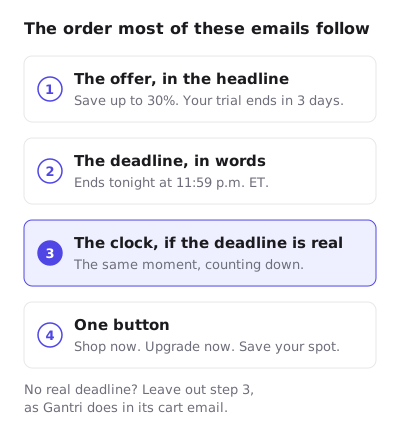
- The offer, in the headline. “Save up to 30%”. “Your trial ends in 3 days”. The reader knows what the email is about before the first image loads.
- The deadline, in words. “Order your Away gifts with free ground shipping by 11:59 p.m. ET tonight.” Text still reads when images are blocked, works with a screen reader and survives a quick skim.
- The clock, if the deadline is real. The same moment, counting down. It adds nothing the words did not say, which is the point: it repeats a true deadline in a form people notice.
- One button. Shop now. Upgrade now. Save your spot. Secondary links exist further down, but the first button is the one the email is for.
The third step is optional. Gantri’s cart email has no deadline and no clock, and it is a better cart email for it. A countdown in an email with nothing behind it is what the FTC’s 2022 staff report calls a “Baseless Countdown Timer”. Fake countdown timers covers that line in full.
Sale email examples
Sonos, Black Friday. The hero is a single sentence of offer (“Save up to 30%”) and one line of copy, then a Shop now button, all above the product photograph. Under the product sit three short reassurances: free shipping and returns, a price match promise and an extended warranty. Those answer the questions a discount raises before the reader has to ask. The end date exists, but only in the fine print: “Offer valid at sonos.com through December 1, 2025”. The added countdown brings that date up to where people read.


Mammut, early access. The headline is the deadline: “Early access ends today”. The discount code, WINTER40, sits in a dashed box as live text, so a reader can select and copy it rather than retype it from a picture. Three plain buttons split the audience by what they shop for. Mammut’s own email had a countdown in this slot, and in the copy kept here it reads all zeros, which is what a countdown image shows when it is fetched after its deadline. That is the normal end of every countdown, and the reason to decide what an expired timer shows before you send.

Cart and stock email examples

Gantri, abandoned cart. “You found something”, then “Still here.” The copy is short and calm: “Maybe it wasn’t the right moment. It isn’t going anywhere.” The email shows the exact lamp left behind, by name, with a Take another look button, and keeps the warranty and the 30-day money-back guarantee for further down. There is no deadline in Gantri’s email. The countdown here was added for illustration between the lamp and the button; in a real send it belongs only if a held discount or price genuinely ends.


Caraway, back in stock. “Back In Stock, But Not for Long” is urgency with a reason attached: “They sold out in days the first time.” The button says what the email means, Shop before they’re gone. Below it, a Perfect Pairing block suggests one related product rather than a grid of twelve. The scarcity claim is about stock rather than time, which is why the honest version of the clock counts to a fixed restock window, not to an invented deadline.


Event email example

Miro, Canvas 26. The first line under the logo is logistics: Streaming live, Tuesday, May 19, 2026, 9am PT. The headline asks one question, “Are you in?”, and Save your spot is the only button above the fold. The second half offers a different way to attend, in-person watch parties, for readers who skipped the first button. Like Mammut, Miro had its own countdown here, and in the copy kept on this site it reads 00 00 00 00, the state any countdown is left in once its moment has passed.

Lifecycle email examples
Zapier, trial ending. “Your trial ends in 3 days” with the reader’s first name, then the same fact in bold in the first paragraph, then one orange Upgrade now button. Help (“Connect with our team”) comes next, for readers who are not ready to pay. The plan comparison is below all of that, so the people who want detail can find it without it slowing down the people who do not. Each reader’s trial ends on a different day, so in a live send each image would need its own deadline.


Nintendo, birthday. The email gives before it asks: 300 My Nintendo Platinum Points, a 15% discount code written out as text, then printable decorations and wallpapers that cost the reader nothing. The code’s expiry is stated in words under the Treat yourself button: “Expires Friday, October 31, 2025”. That line is the deadline, and the countdown sits right above it.


Hydro Flask, members week. The top panel says “Last chance” and “2x rewards ends tonight”. Halfway down, a Points Status card shows the reader’s own number, 100 points to the next reward, and then the reason to act now: “2x points gets you there faster through midnight.” A personal number is more persuasive than a site-wide one, and the deadline is the reason the double points exist.


Seasonal email examples
AWAY, free shipping cutoff. The deadline is operational, not promotional: “Order your Away gifts with free ground shipping by 11:59 p.m. ET tonight for guaranteed delivery by December 24.” It names the time, the time zone and what the reader loses by missing it. The rest of the email stacks two more reasons to shop, a Flex luggage discount and a backpack back in stock, each with its own button.


LEGO, holiday early access. “Early Access for Members” sits above the first headline, “Jingle bricks”, so the reader knows they are early before they see a product. The email then works like a catalogue page: two featured sets with their own buttons, a membership tip, the reader’s points total and two rewards to redeem. It is long, but every section is a separate way in, which suits a holiday email aimed at gift buyers with different budgets.

How to use these examples in your own email
Copy the decisions, not the designs.
- Write the deadline as text first. Every example with a real deadline states it in words. A countdown repeats it; it does not replace it.
- Pick one first button. Even the long LEGO and AWAY emails make the first button obvious.
- Decide what the timer shows after the deadline. The Mammut and Miro copies show what happens when nobody did: zeros, for ever. A “this offer has ended” image is a better last state.
- Leave the clock out when nothing ends. Gantri’s email is the proof that a calm email can do the job.
To try a countdown in your own campaign, the free countdown timer generator makes one without an account. The Black Friday playbook shows how the sale emails above extend into a full week of sends, and the drip campaign guide covers the lifecycle emails as sequences.
Questions and answers
What is a good example of email marketing?
One with a single clear offer in the headline, the deadline stated in words, and one obvious first button. Zapier’s trial ending email above does all three in the first screen.
What are the main types of marketing emails?
Promotional emails such as sales and launches, lifecycle emails triggered by a person’s own behavior such as cart reminders, trial endings and birthdays, and newsletters that go to the whole list on a schedule.
Are these brands EmailTimer.App customers?
No. Each email is shown as the brand sent it, with an EmailTimer.App timer added for illustration, and the label under every email says the brand is not a customer.
Should every marketing email have a countdown timer?
No. Only an email with a real deadline: a sale that ends, a code that expires, a shipping cutoff. An email without one, like Gantri’s, is better without a clock.
Why do some of these countdowns show all zeros?
Mammut and Miro had their own countdowns in the emails, and in the copies kept here those read zero. That is what a countdown image shows when it is fetched after its deadline, unless the sender set an expired image.
Sources
Related
Put a countdown in the campaign you are writing now
The free plan covers 5,000 opens a month with no card. Starter is $19 a month for 250,000.
These emails belong to the brands that sent them and are credited to each one. We added our timers to show how they look in real campaigns. Brand owners can ask us to remove their email at privacy@emailtimer.app, and we will do it the same day.