

An event reminder email is a short message sent to people who have already registered, so they turn up at the right time. The usual sequence is a confirmation at sign-up, then reminders a week before, a day before and an hour before, plus a “starting now” email for an online event. Each one repeats the time with its zone, and the place or the link.
Reminders are one of the simplest automated reminder sequences to build, because every send hangs off one date: the start. This page covers the sequence after registration, two templates, calendar files, the no-show follow-up, and when a reminder stops being a service message. The invitation has its own guide, how to write an event invitation email.
How many event reminder emails should you send, and when?
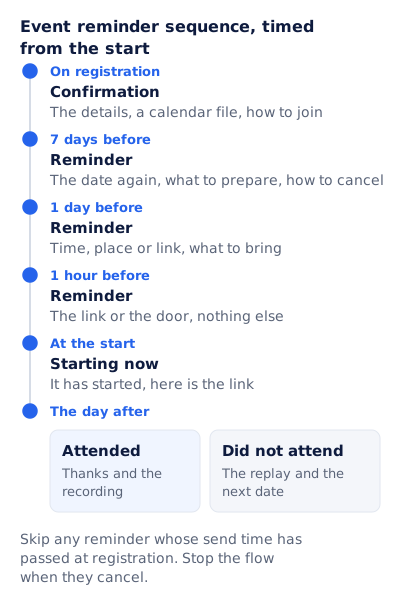
Three reminders and a confirmation cover most events. Time every send from the start, not from the registration, so a person who signs up on the day gets the same last reminders as one who signed up a month ago.
| When | What it says | Skip it when | |
|---|---|---|---|
| Confirmation | On registration | The details, a calendar file, how to join | Never |
| Reminder | 7 days before | The date again, what to prepare, how to cancel | They registered less than a week out |
| Reminder | 1 day before | Time, place or link, what to bring | They registered today |
| Reminder | 1 hour before | The link or the door, nothing else | In person: send it on the morning instead, so people can travel |
| Starting now | At the start | It has started, here is the link | Any in-person event |
| Follow-up | The day after | Attended: thanks and the recording. Did not attend: the replay and the next date | Never |
Two rules keep the flow from embarrassing you. Skip any reminder whose send time has passed at registration, so nobody who signs up on Tuesday gets a “one week to go” email for a Friday event. And stop the flow when they cancel. The “how to cancel” line is there for the same reason: for a capped room, a seat given back is a seat for the waiting list.
Everyone in this flow has already said yes. A last call to people who have not registered, before registration closes, is a deadline email with a different job, covered in the last chance email.
What should each reminder say?
Less each time. The confirmation carries everything; the hour-before reminder carries one link. A reader glancing at the inbox sees only the subject line and the preheader, so put the time and zone in one of them every time.
| Reminder | Subject line | Preheader |
|---|---|---|
| 7 days before | [Event] is a week away: [day, date] | [Time and zone]. What to prepare, and how to cancel if you cannot come. |
| 1 day before | Tomorrow at [time and zone]: [event] | [Address or “online”]. What to bring, and where to go. |
| 1 hour before | [Event] starts at [time and zone]: your link | One click to join. |
| Starting now | We are live: [event] | It started a few minutes ago. Join from here. |
An event reminder email template for an in-person event
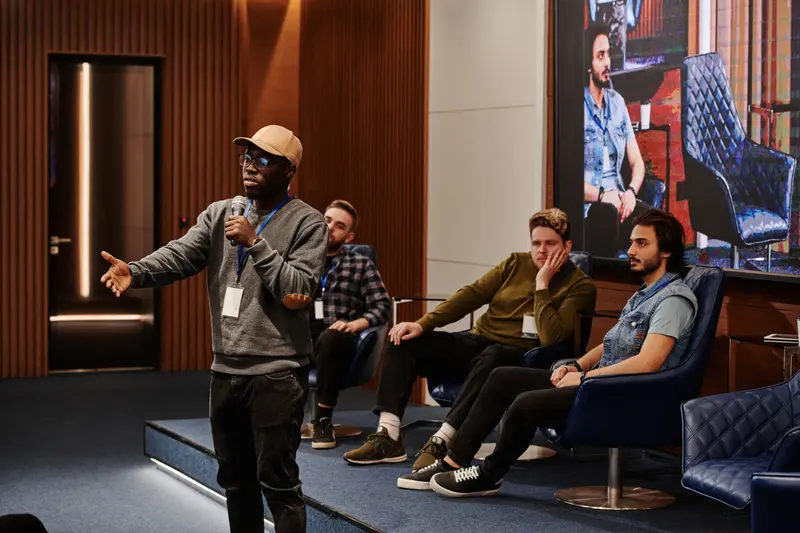
The day-before reminder carries the most practical detail, because it is the one people read with their coat on.
Subject: Tomorrow at [time and zone]: [event]
Preheader: [Venue], [city]. Doors open at [time]. What to bring is inside.

Hi [first name],

See you tomorrow.

[Event name]
[Day, date], [start] to [end] [time zone]
[Venue name, street address]  [Map link]

Getting in: doors open at [time]. Bring [your ticket / photo ID].
Getting there: [nearest station, parking, step-free entrance].

[Button: Add to calendar]

Cannot come after all? [Cancel your place] and we will offer it to
someone on the waiting list.

Questions on the day: [phone number] or reply to this email.

[Host name]
[Postal address]
A webinar reminder email template
An online event needs less logistics and more links. The hour-before reminder and the “starting now” email are both one link and one sentence.
Subject: Winter planning for lifecycle teams starts at 11am ET: your link
Preheader: One click to join. 90 minutes, recording sent the day after.

Hi [first name],

We start in an hour: Wednesday 18 November, 11am ET (8am PT, 4pm in London).

[Button: Join the session]

[What they need: a browser, or the app.]
If you cannot make it, do nothing: the recording will arrive the day after.

[Host name]
[Postal address]  ·  [Unsubscribe]
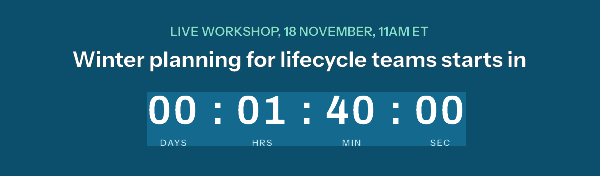
A countdown image does the arithmetic for the reader: “1 hour 40 minutes” needs no conversion from ET. And because an EmailTimer.app image is drawn when the email is opened, one template can change state with the clock, so a reminder opened late shows a join button or the replay instead of a clock stuck at zero.
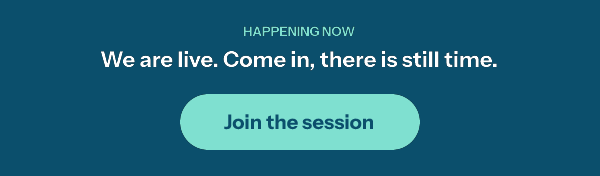
The button is part of the picture, so its link should go to a page that is right at each moment: the join page before and during, the recording after. This is one kind of dynamic email content, the rules that switch it are on the Starter plan and up, and webinar and event registration builds it in full. For a plain countdown without the later states, use the free countdown timer generator: a timer from it works for 500 opens without an account, and for 1,000 once you sign in and claim it. Its image at zero reads “Offer ended”, which is wrong for an event, so the live and replay states need an account.
How do you get the time zone right in a reminder?
Write the zone every time, in a form that is right all year. “ET” is right in any month. “EST” is wrong between the second Sunday of March and the first Sunday of November, when US Eastern time is on daylight saving time under 15 U.S.C. 260a. For a list across several countries, add one or two conversions, as the webinar template does.
Then let the calendar file carry the real time. An .ics file follows RFC 5545, and three of its properties decide whether it lands at the right hour:
- The start, in UTC or with a named zone.
DTSTART:20261118T160000Zis 11am ET on 18 November 2026; the Z marks UTC. The other correct form is aTZIDwith a matchingVTIMEZONEdefinition. A time with neither is “floating”, and RFC 5545 warns that two attendees in different time zones “may be participating in the event at different actual times”. - A
UIDthat never changes. The standard calls it “the persistent, globally unique identifier for the calendar component”. Use the same one in every email about the event. - A
SEQUENCEthat goes up when the event changes. It starts at 0 and rises “each time the Organizer makes a significant revision”. Same UID, higher sequence: that is how a calendar tells a new time from a second event.
BEGIN:VCALENDAR
VERSION:2.0
PRODID:-//Example Events//Reminders//EN
BEGIN:VEVENT
UID:winter-planning-2026-11-18@example.com
DTSTAMP:20261103T150000Z
DTSTART:20261118T160000Z
DTEND:20261118T173000Z
SUMMARY:Winter planning for lifecycle teams
LOCATION:https://example.com/live/winter-planning
SEQUENCE:0
END:VEVENT
END:VCALENDAR
If the time does change, do not leave it to the next scheduled reminder. Send a change notice the same day with the old and the new time in words (“moved from 11am ET to 1pm ET”), attach a new file with the same UID and SEQUENCE:1, and move every remaining reminder to the new start.
What do you send people who registered but did not come?
Split the follow-up on attendance. A webinar platform that exports who joined gives you the split; for an in-person event, a check-in scan at the door does. Without either, send one neutral follow-up to everyone rather than thanking people who were not there.
The no-show email is short and carries no blame:
Subject: The recording of [event] is ready
Preheader: [Length] minutes. Watch it when it suits you.

Hi [first name],

We missed you on [date]. The full recording is here:
[Button: Watch the replay]

Short on time? Start at [timestamp], where [the one part worth seeing].

The next session is [day, date, time and zone]. [Save a place]

[Host name]
[Postal address]  ·  [Unsubscribe]
The recording is what they registered for, so sending it is service. The last line promotes another event, and the next section explains why that changes what kind of email this is.
When does an event reminder become a marketing email?
When it carries a promotion. The time, the place and the link are service; a discount, a product or another event is marketing, and the US and UK draw the line in different places.
In the US, the FTC’s rule at 16 CFR 316.3 counts as transactional content that delivers “goods or services … that the recipient is entitled to receive under the terms of a transaction that the recipient has previously agreed to enter into with the sender”. A reminder about a ticket someone bought fits. If it also promotes something, 316.3(a)(2) makes it commercial when a reader of the subject line would likely conclude it contains an advertisement, or when the reminder content does not appear “in whole or in substantial part, at the beginning of the body”. The list is written around transactions, so a free registration fits it less clearly: give a free webinar’s reminders the unsubscribe link and postal address anyway.
In the UK, the ICO calls these “service messages”, messages “that aren’t promotional but are for administrative or customer services purposes”, including messages to “confirm or remind them about appointments”. It is stricter about mixing: “If your service message has elements that are direct marketing, even if that is not the main purpose of your message, then it will count as direct marketing.” General branding and logos do not count.
| What the reminder contains | US (CAN-SPAM) | UK (ICO) |
|---|---|---|
| Time, place or link, calendar file, your logo | Transactional, for a ticket they bought | Service message |
| The same, with a line about your next event below the details and a neutral subject | Transactional under the 316.3(a)(2) test | Direct marketing |
| A discount first, or a subject line that reads as an ad | Commercial: every CAN-SPAM rule applies | Direct marketing |
If you send to both countries from one flow, the UK rule decides: keep the reminders to the event, and move the next-event line into an email that goes only to people who agreed to marketing.
Questions and answers
How far before an event should you send a reminder email?
A week before and a day before for most events, plus an hour before for an online one. Time each from the start, and skip any whose send time had passed when the person registered.
What is the difference between a webinar reminder email and an event reminder email?
A webinar reminder carries a join link and works best close to the start, with a “starting now” email at the start. An in-person reminder carries the address and entry details, early enough to travel.
Should an event reminder email include a calendar file?
The confirmation should, and a reminder can link to it again. Write the start in UTC or with a named zone, and keep the same UID in every file so a calendar can match an update to its entry.
Do event reminder emails need an unsubscribe link?
A reminder about a ticket someone bought, with nothing else in it, is transactional under CAN-SPAM and a service message for the ICO. Once it carries a promotion, it is commercial or direct marketing, and the unsubscribe and consent rules apply. For a free event, include the link anyway.
What should you send if the event time changes?
A change notice the same day, with the old and new times in words, a calendar file with the same UID and a higher SEQUENCE, and the remaining reminders moved to the new start.
Sources
- RFC 5545, Internet Calendaring and Scheduling Core Object Specification (iCalendar) (IETF, September 2009), read on 3 November 2026
- 15 U.S. Code 260a, Advancement of time or changeover dates (Legal Information Institute, Cornell Law School), read on 3 November 2026
- CAN-SPAM Act: A Compliance Guide for Business (Federal Trade Commission), read on 3 November 2026
- 16 CFR 316.3, Primary purpose (Electronic Code of Federal Regulations), read on 3 November 2026
- Identify direct marketing (Information Commissioner's Office, UK), read on 3 November 2026
- Photo by Diva Plavalaguna on Pexels
- Photo by Henri Mathieu-Saint-Laurent on Pexels
Related
Put a countdown in the campaign you are writing now
The free plan covers 5,000 opens a month with no card. Starter is $19 a month for 250,000.