

Variable data printing (VDP) is digital printing in which text, images or codes change from one piece to the next within a single print run, driven by a data file. The USPS describes it as a technique that “allows tailored mailpieces to be printed right next to each other on a single print run”. Each record in the file becomes one finished piece.
This page is for print and direct mail teams. The first half explains VDP the way a print buyer meets it: the data file, the template and the press. The second half shows the same idea in email, where image personalization for email draws each subscriber’s picture when the email is opened rather than when the press runs, and how to run the email half of a mailing from the data file you already prepared for print.
What is variable data printing?
A conventional print run makes many copies of one design. A VDP run makes many versions of one design: the layout stays the same, and named fields in it are filled from a different record for every piece. That is only practical on digital presses, which do not need a new plate for each change. The USPS notes that digital printers can handle quantities “as low as one item”.
The USPS Irresistible Mail page lists what tends to vary on a direct mail piece:
- names, images, text and language;
- coupons and deals based on “browsing history, purchase behavior, or store locations”;
- color and data visualization, “such as a map from address to store”;
- rewards, incentives and loyalty messages;
- custom lookbooks or itineraries;
- “a personalized URL or QR Code” for tracking.
It helps to separate three depths of variation, because they cost different amounts of work. Versioning swaps whole blocks by segment: one cover for the north, another for the south. Personalizing fills fields inside one design: a name, a store, a code. Full customization changes the content of the piece itself per person, such as a lookbook built from what each customer bought. Most direct mail sits in the first two, and so does almost every email.
How is a VDP job put together?
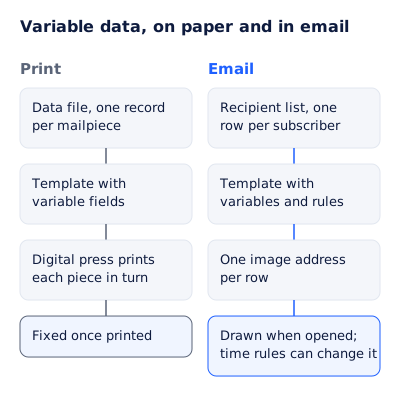
The USPS breaks it into three steps: data collection (“quality data is critical in VDP”), template design “with variable elements in mind”, and digital printing, where the vendor syncs data and design and prints the pieces.
In design software that becomes a data merge. Adobe’s InDesign documentation calls the parts a data source, a target document and a merged document:
| Part | What it is, in Adobe’s terms | Rules worth knowing |
|---|---|---|
| Data source | “The file that contains all variable information arranged in rows and columns” | CSV, tab or semicolon delimited text; “the first row must contain the field names” |
| Target document | The layout with “data-field placeholders” plus the boilerplate that stays the same | Insert fields from the Data Merge panel, never by typing them |
| Image fields | A column whose header starts with @, such as @Photos | Each cell holds a file path, absolute or relative to the data file |
| QR code fields | A column whose header starts with #, such as #QRCode | Web links are written as URL: followed by the address |
| Merged document | The layout repeated once per record | This is what goes to the press or to PDF |
A typical data file for a store-opening postcard looks like this:
first_name,store,code,@StorePhoto,#QRCode
Maya,"Leeds, Briggate",LDS-2611-MAYA,/Photos/leeds.jpg,URL:https://example.com/s/LDS-2611-MAYA
Tom,"Bristol, Park Street",BRS-2611-TOM,/Photos/bristol.jpg,URL:https://example.com/s/BRS-2611-TOM
Two details catch people out. A store name with a comma in it has to be in quotation marks, as Adobe’s page notes, or the comma splits it into two fields. And every image path has to exist on the machine doing the merge, which is why print shops ask for the photos and the data file together.
The same idea in email, at open time
An email campaign with a picture per person has the same three parts. The data file becomes a recipient list. The target document becomes a template with variables. The press run becomes a set of image addresses, one per row, and each picture is drawn when that subscriber’s mail client asks for it.
Here is the email half of the postcard above, drawn by the EmailTimer.app engine from one template and the same names, stores and codes:


To build it in EmailTimer.app on the Growth or Agency plan (see pricing):
- Save a copy of the print data file with only the columns the email needs, and add an
emailcolumn. Drop the@and#columns: an email template does not read file paths, and its QR code layer takes the value directly. - In the editor, design the template with variables named after your columns: a text layer reading
{{first_name}}, a gift is waiting at, another reading{{store}}, a text layer and a QR code layer both drawing{{code}}. - Upload the CSV as a recipient list. A row that cannot be read is reported with its line number and the reason, and the rest imports.
- Export one signed image address per row and import it into your email platform as a contact field.
- Proof it: preview the template with two or three real rows, then send yourself a test.
Store photos work too, with one change from InDesign. Instead of a path per row, you upload the photos to the template once and an image layer picks one by a value in the row, such as the store’s short name. Image mail merge compares the file-path way and the email way in more detail.
Where print and email differ
| Question | Variable data printing | Variable data in email |
|---|---|---|
| When each piece is made | At the press, before mailing | When the email is opened |
| Can it change after it is sent | No | Yes, by rules on the time of opening, such as “ends tonight” on the last day |
| A deadline | A printed date | A countdown that shows the time left at each open |
| Proofing | Printed or PDF proofs of sample records | A preview drawn by the same renderer that serves the inbox, then a test send |
| A missing value | Whatever the merge does with an empty field | The fallback you set per variable: a default, a hidden layer or a hidden group |
| Personal URL or QR code | A field per record | A QR code layer per row |
| What it costs per piece | Print and postage | Image opens against your plan |
The second row is the one a print team does not have. On paper, “this weekend only” stays on the fridge after the weekend ends. In email, a rule on the time of opening can swap the line, hide the code or show an ended state once the offer is over, so a late reader is not sent to a store with an expired code.
The reverse is also true. Data visualization such as a map from each address to the nearest store is on the USPS list for print; EmailTimer.app does not draw maps, and it does not fetch outside data while drawing. A store’s name, photo, address line and opening hours from your data file are what the email image can show.
For teams that send named awards or completion documents to a list, the same file-to-image flow covers certificates by email. For a broader view of how far per-person content can go in email, hyper-personalization sets out what needs data you may not have.

Running a mailing and its email together
When the postcard and the email are one campaign, keep these the same across both:
- the code each person gets, so either one works at the till;
- the store each person is sent to;
- the offer’s end date and time, written the same way;
- the suppressions: email opt-outs come off the email list and mail opt-outs come off the mail list, each checked on its own.
Then plan the timing. A printed piece arrives on whatever day the post delivers it, across a spread of days. An email lands when you send it. Sending the email to arrive around the expected delivery date, rather than days ahead, makes the two feel like one message.
Questions and answers
What is variable data printing used for?
Direct mail where each piece carries the recipient’s own details: name, nearest store, offer code, loyalty reward, a personalized URL or QR code. The USPS lists all of these as common uses.
What file format does variable data printing use?
Usually a CSV or other delimited text file, one record per row with field names in the first row. InDesign marks image columns with @ and QR code columns with #.
Is there variable data for email?
Yes. A recipient list plays the part of the data file, a template with variables plays the part of the print layout, and each row gets its own image address that draws that person’s picture when the email is opened.
Can I use my print data file for the email?
Mostly. Keep the columns the email needs, add an email column, and remove the image path and QR code columns, since the email template uploads photos once and draws QR codes from a value.
What can email do that a printed piece cannot?
Change after it is sent. A rule on the time of opening can swap the offer line or hide an expired code, and a countdown shows the time left at each open.
Sources
- Variable Data Printing (VDP), Irresistible Mail by USPS, read on 4 November 2026
- Data merge overview in InDesign (Adobe Help Center), read on 4 November 2026
- Add and edit data merge fields in InDesign (Adobe Help Center), read on 4 November 2026
- Add QR codes to merged documents in InDesign (Adobe Help Center), read on 4 November 2026
- Photo by Christopher Finklea on Pexels
- Photo by Vika Glitter on Pexels
Related
Put a countdown in the campaign you are writing now
The free plan covers 5,000 opens a month with no card. Starter is $19 a month for 250,000.