

A referral email asks a customer to recommend you and gives them something to share: a code or link that credits them when a friend signs up. The invite is only the first of four. The update when a friend joins, one reminder and the reward email do as much work, and each is clearer when it shows that customer’s own code and count.
This page is about the business kind of referral email, a company asking its customers to bring in friends, not a request for a job referral. It gives a template for each of the four emails, a way to put each referrer’s code and progress into the image with image personalization for email, and what the US and UK regulators say about the message the friend receives, which is where referral programs most often go wrong.
What should a referral email include?
| Part | What it says | Example |
|---|---|---|
| Subject line | What both people get, in plain words | Give a friend 20% off, get a month free |
| The offer, both sides | The friend’s reward and the referrer’s reward | Friends get 20% off their first order. Three friends and your next month is free |
| Their code or link | One code per referrer, so the credit lands with the right person | MAYA-K7Q2 |
| How far along they are | How many friends have joined so far, out of how many | 2 of 3 friends have joined |
| One button | A link to the page where they can copy their link | Get your link |
| The terms | When the reward applies, what counts as a referral, when it ends | A link to the full terms |
Two of those rows are per person: the code and the progress. They are also the two that a generic referral email leaves out, and the reason a customer who referred two friends last month gets an invite that reads as if they had never heard of the program.
The four emails a referral program sends
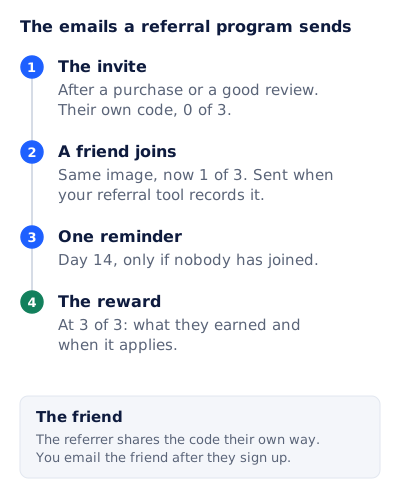
The timings below are a sensible starting point, not a rule. Change them to fit how often your customers buy.
The invite
Send it after a moment when the customer is pleased with you: a second order, a delivery that arrived early, a five star review. A customer who has just complained is the wrong audience.
Subject: Give a friend 20% off, get a month free
Preheader: Your own code is inside. Three friends and next month is on us.

Hi [first name],

Know someone who would like [product]? Give them your code and they get
20% off their first order.

[Image: your code, MAYA-K7Q2, and 0 of 3 friends joined]

Your code: [code]
[Get your link]

When three friends have ordered, your next month is free.
Full terms: [link]
A friend joined
Send it when your referral tool or store records the friend’s first order. This is the email most programs skip, and it is the one that makes the referrer try again.
Subject: Sam just used your code
Preheader: That is 1 of 3. Two more and your next month is free.

Hi [first name],

Sam ordered with your code. Thank you for sending them our way.

[Image: 1 of 3 friends joined, with the progress bar a third full]

Two more and your next month is free. Your code still works: [code]
[Get your link]
Name the friend only if your program told both people it would. “A friend just used your code” works if it did not.
One reminder
If nobody has used the code after about two weeks, send one reminder. After that, let it rest until the next good moment, such as the next order.
Subject: Your code is still waiting, [first name]
Preheader: 20% off for a friend, a free month for you.

[Image: your code, and 0 of 3]

Most people share it in a group chat or by text. Your code: [code]
The reward
Send it the day the reward is earned. Say exactly what they got and when it applies, and stop there.
Subject: Your next month is free
Preheader: Three friends ordered with your code. Here is what happens now.

Hi [first name],

Three friends have ordered with your code, so your next month is on us.
It applies to your bill on [date]. You do not need to do anything.

[Image: 3 of 3, bar full, "Your free month starts [date]"]

Your code keeps working if you want to keep sharing it.
Putting each referrer’s code and progress in the image
The templates above call for an image that shows the reader’s own code and count. With one template, every referrer gets their own picture:
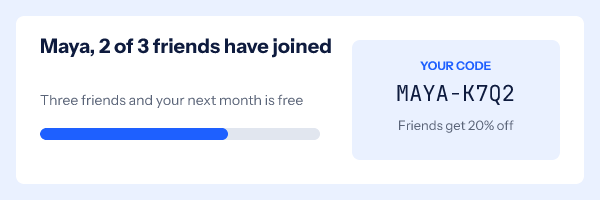
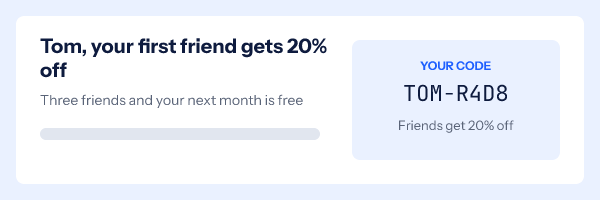
The template has four variables: first_name, code, joined and progress (a number from 0 to 100 for the bar). One rule reads “if joined is 0, change the headline”, which turns a discouraging zero into an invitation. The code chip is a group that hides itself if the code is missing, so a row without a code never shows an empty box. The progress bar page goes further into drawing bars from a number.
The values reach the image in one of two ways, both on the Growth and Agency plans listed on pricing:
- A recipient list. Export your referrers from your referral tool as a CSV with
email,first_name,code,joinedandprogresscolumns, upload it, and download one signed image address per row to import into your email platform as a contact field. - The API, for programs where your own system sends each email. Mint an address with that referrer’s values at the moment the email is triggered.
One thing to be clear about: the image does not look up the count by itself. It draws the values it was given, so the count in email 2 is the count at the moment you minted or uploaded it. That is why the “friend joined” email is triggered by the join: the address is made at that moment, with the new number in it.
Two practical rules for the code itself:
- Put the code in live text as well as in the image. Nobody can copy text out of a picture, and some readers have images turned off.
- Write the alt text with the code in it, such as “Your code MAYA-K7Q2, 2 of 3 friends joined”, so a screen reader or a blocked image still tells them what they need.
For a referral program that rewards with a discount rather than a free month, each friend may also need a code of their own that works once; unique coupon codes covers making and drawing those. And if referrers tell friends in person, a QR code of their link in the image lets a friend scan it from the referrer’s phone; QR codes in email covers sizes and what scans reliably.
Who is responsible for the email the friend receives?
This is the part of a referral program that most guides leave out, and both the US and UK regulators have written about it directly.
In the US, the FTC’s CAN-SPAM compliance guide answers the question for “Forward to a Friend” messages. Whether a seller is responsible “often depends on” whether the seller “has offered to pay the forwarder or give the forwarder some other benefit”. It adds that if a seller “pays or gives a benefit to someone in exchange for generating traffic to a website or for any form of referral, the seller is likely to have compliance obligations under the CAN-SPAM Act.” A referral program pays a benefit by design. So if your program has referrers send an email you wrote, plan on that email meeting CAN-SPAM’s rules, including the opt-out and the postal address.
In the UK the line is stricter. The ICO’s guidance on electronic mail marketing says that if you encourage people to pass on your marketing, “you’re likely to be instigating those messages and you must comply with PECR”, and that “you don’t need to give an incentive for it to count as instigating.” It also says you “must not rely on the soft opt-ins for ‘refer a friend’ schemes”, and that consent from the friends “is unlikely to be possible in practice”.
The ICO gives two examples that set out the safe design. A retailer that “automatically creates a marketing email for the customer to send to their friends or family” is responsible for those emails, and they do not comply. A company whose page shows the scheme but “does not tell the customer how to share the scheme or suggest that they should send emails or texts” is not responsible if a customer chooses to email a friend.
| Design choice | US (FTC CAN-SPAM guide) | UK (ICO PECR guidance) |
|---|---|---|
| A “send to a friend” form that emails your message to an address the referrer types | You are likely responsible: the referrer gets a benefit | You are instigating, and you will not have the friend’s consent |
| A pre-written email for the referrer to send from their own account | Likely responsible, for the same reason | Instigating: the ICO’s first example |
| A code or link the referrer shares however they like | The referrer’s own message | Not instigating if you do not suggest emails or texts |
| An email to the friend after they sign up and agree | Your normal marketing rules apply | Your normal consent rules apply |
In practice that means your four referral emails go to the referrer, who is already your customer, and the friend hears from you only after they sign up. This is a summary of the regulators’ own guidance, not legal advice for your program.
Questions and answers
What is a referral email?
An email that asks an existing customer to recommend you to friends, usually with a reward for both people and a code or link that credits the referrer. A full program also sends progress updates, a reminder and a reward email.
What should a referral email subject line say?
What both people get, in plain words: “Give a friend 20% off, get a month free”. For the follow-ups, say what happened: “Sam just used your code” or “Your next month is free”.
Can readers copy a referral code from an image?
No. Put the code in live text as well, with a button to a page where it can be copied, and include it in the image’s alt text for readers who have images turned off.
Does the progress bar update by itself after the email is sent?
No. The image draws the count it was given when the address was made. Send a new email with a newly made address when the count changes.
Can I email the friend a customer refers?
In the UK, the ICO says you need the friend’s consent and cannot rely on the soft opt-in, which is rarely possible for a referral. In the US, a sender who gives a benefit for referrals is likely responsible under CAN-SPAM. The safe design is to let referrers share a code their own way and email the friend after they sign up.
When is the best time to send a referral invite?
Just after a moment the customer is happy with you, such as a repeat order, an early delivery or a good review. Avoid sending it right after a complaint or a late order.
Sources
Related
- Unique coupon codes in email, one single-use code per customer
- A progress bar GIF for email, and the bar that knows each reader
- QR codes in email, and a different code for every recipient
- Loyalty program email examples, from the welcome to the anniversary
- Email personalization: what to tailor, with which data, and where to stop
Put a countdown in the campaign you are writing now
The free plan covers 5,000 opens a month with no card. Starter is $19 a month for 250,000.