
A QR code in email is worth adding when the code will be scanned somewhere other than the screen it arrives on: a ticket at a venue door, an offer at a shop till, a check-in desk. Anywhere else, a link does the job better. If you add one, make it big, keep a white margin around it, put the same value in text beside it, and give each recipient their own code.
A code pasted into a campaign is the same picture for everyone. A per-person code is a job for image personalization for email: the code is drawn into the image when the email is opened, from that recipient’s own value.
When does a QR code in an email make sense?
The test: is there a second screen, or a scanner, at the moment the code gets used? A reader on their phone cannot point that same phone at it, and a button reaches the same place in one tap.
| Situation | QR code? | Why |
|---|---|---|
| Event ticket or check-in | Yes | Door staff scan the attendee’s phone screen, so the code is the ticket |
| In-store offer from an email | Yes | The till scans the code, and nobody types a 12 character string at a counter |
| Reading on a laptop, acting on a phone | Sometimes | The phone camera can read the laptop screen; still add a link for phone readers |
| A link to your website or a sale | No | A button is one tap on every device; a code needs a second device |
| An unexpected account or delivery message | No | This is the pattern the FTC warns people about (see below) |
Microsoft’s documentation for its own marketing product, Dynamics 365 Customer Insights, lists the same uses: a QR code in an email so recipients can “register for an event”, or to link to “a survey, a file, or a specific URL”, and a personalized code so “attendees check in quickly at the event”. It also notes that “custom development is required to implement the necessary verification, check-in, and registration features.” A QR code carries a value to a scanner; checking it is your system’s job.

How to scan a QR code in an email
From another device. Point a phone’s camera at the screen showing the email. Apple’s support page gives the iPhone steps: open the Camera app, then “hold your device so that the QR code appears, then tap the link to open the content.” The Code Scanner control in Control Center does the same. On Android, the route depends on the phone’s maker.
On the same phone. A camera cannot see its own screen. Apple’s developer documentation lists QR codes among the machine-readable codes its image analysis recognizes inside an image, from iOS 16, so a screenshot of the email opened in Photos is worth a try on an iPhone. Nobody should have to know this, which is the best argument for printing a link and the code’s value as text next to every QR code you send.
Size, quiet zone and contrast
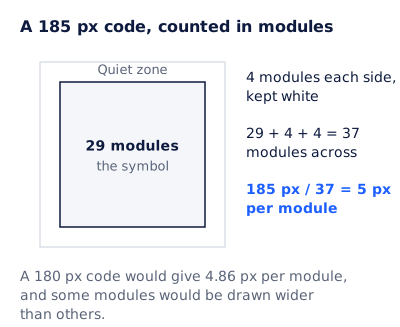
A QR code is a grid of square modules. DENSO WAVE, the company that created the format, states that “QR Code requires a four-module wide margin at all sides of a symbol”. That margin is the quiet zone: plain white space the scanner uses to find the edges. A code pushed up against a colored background or a border with no quiet zone is a common reason a code will not scan.
How many modules a code has depends on how much it holds. The table comes from encoding four sample values at error correction level M, which DENSO WAVE calls the level “most frequently selected”, restoring about 15% of a damaged symbol.
| What the code holds | Characters | QR version | Modules across, with the quiet zone | Pixels per module at 185 px |
|---|---|---|---|---|
A ticket number, TKT-48213 |
9 | 1 | 29 | 6.38 |
A short link, https://example.com/t/TKT-48213 |
31 | 3 | 37 | 5 |
| A mailto link with a subject | 46 | 4 | 41 | 4.51 |
| A long link with two query parameters | 74 | 5 | 45 | 4.11 |
Two practical rules follow.
Keep the payload short. Extra characters push the code up a version, and a bigger version means smaller modules at the same image size. A ticket ID that your check-in system looks up beats a long address full of campaign parameters.
Pick an image size that divides evenly. Take the short link: the symbol is 29 modules, plus 4 modules each side, kept white, so 29 + 4 + 4 = 37 modules across, and 185 px / 37 = 5 px per module. A 180 px code would give 4.86 px per module, and some modules would be drawn wider than others. Scanners usually cope, but whole pixels cost nothing.
Contrast matters more than style. A code recolored to match a brand palette, or with a logo dropped in the middle, spends error correction you may need for a cracked phone screen at the door. The QR layer in EmailTimer.app always draws black modules on an opaque white quiet zone of four modules, at level M, whatever the design around it, because a code drawn over a dark canvas does not scan.
A QR code per attendee
A code from a free online generator is one picture: fine for “see our menu”, useless for a ticket or a single-use voucher. In EmailTimer.app that is a QR layer whose content contains a variable, for example https://example.com/t/{{ticket}}, placed in a template next to the text you want. When the email is opened, the renderer draws the image with that recipient’s ticket number in the text and in the code.
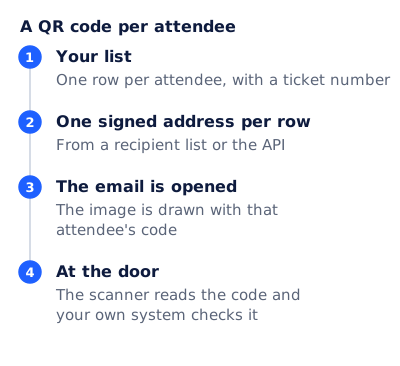
The four steps:
- Your list. One row per attendee, with a ticket number, exported from your ticketing or registration system.
- One signed address per row. Upload the list as a recipient list and export one signed image address per row, or mint the addresses from your own code through the API. From a recipient list or the API, each address carries an opaque token or that row’s values, and the signature means nobody can edit them.
- The email is opened. The address sits in a contact field in your email platform, the image
srcis that field, and the image is drawn with that attendee’s code. - At the door. The scanner reads the code and your own system checks it.
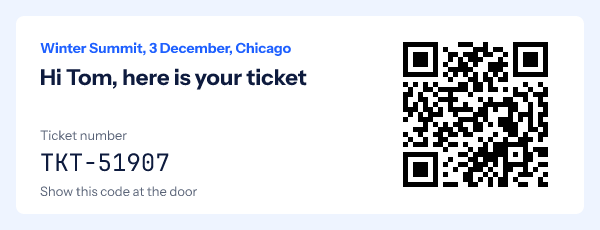
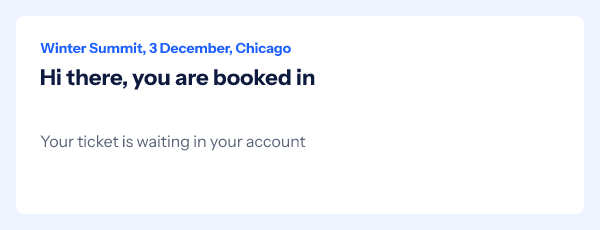
Details from the renderer that matter for tickets:
- A missing value never becomes a broken code. Each variable has a fallback: draw a default, hide the layer, or hide its group. An empty code draws nothing.
- A value too long to encode drops only the QR layer, and the rest of the image still renders.
- Plans. Personalized QR codes are listed with Starter on pricing. A different code for each person needs per-recipient addresses, which come with Growth and Agency.
The same layer carries a unique coupon code for a shop till, a check link on certificates sent in bulk, and each referrer’s own link in a referral email.
What if images are turned off?
A QR code in an email is an image, so it is only as reliable as image loading. Microsoft’s support page says “Microsoft Outlook is configured by default to block automatic picture downloads from the Internet” in classic Outlook. Plan for a reader who sees an empty box:
- Put the ticket number or voucher code in live HTML text next to the image.
- Add a plain link to the same destination (“View your ticket”).
- Write alt text that says what the code is for, such as “QR code for ticket TKT-48213”. Alt text cannot be scanned, but it tells the reader what is missing.
- Set
widthandheighton the<img>tag so the layout holds while images are off.
How to keep a QR code from looking like a scam
The Federal Trade Commission’s consumer alert of 6 December 2023, “Scammers hide harmful links in QR codes to steal your information”, advises: “Don’t scan a QR code in an email or text message you weren’t expecting”. It describes messages that claim a failed delivery, a problem with an account or suspicious activity, and tells people to “inspect the URL before you open it.”
That shapes how a legitimate sender should use one:
- Send codes only in messages the reader expects: a ticket they bought, an offer they signed up for.
- Encode a link on your own domain, not a link shortener, so the preview a phone shows is recognizable.
- Print the destination under the code and offer the same link as text.
- Never use a code for a login, a password reset or a payment.
A QR code for your email address
Many searches for “qr code generator for email” want something else: a code that starts a new message to an address. That code holds a mailto: link, defined in RFC 6068, which can carry a subject and a body too. The RFC’s own example is mailto:user@example.org?subject=caf%C3%A9&body=caf%C3%A9, and it says “all spaces SHOULD be encoded as %20”. It belongs on a poster or a business card. Inside an email a mailto: link does the same in one tap.
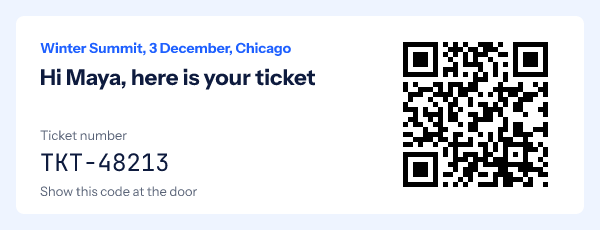
An event ticket email you can copy
Subject: Your ticket for Winter Summit, 3 December
Preheader: Show the code at the door. Doors open 8:30am.

[Image: the ticket, with name, ticket number and QR code]
Alt text: QR code for ticket {ticket number}

Your ticket number: {ticket number}   (live text, not only in the image)
View your ticket online: {link}        (for anyone reading on their phone)

When:   3 December, doors 8:30am, talks from 9:00am
Where:  {venue and address}, with a map link
Bring:  this email on your phone, or a printout

Can't come? {link to transfer or cancel}
Send it at booking, then again the day before as a reminder; the event reminder email guide covers that timing. Because the code is drawn when the email is opened, the same signed address works in both sends.
Questions and answers
How do I scan a QR code that was sent to my email?
Open the email on a computer or a second phone and point your phone’s camera at it. On the same iPhone, take a screenshot and open it in Photos; Apple’s image analysis on iOS 16 and later recognizes QR codes inside images. If that fails, use the link the sender should have put beside the code.
What size should a QR code in an email be?
Big enough for whole pixels per module, with a four-module white margin. Count the modules for your content, add eight for the quiet zone, and pick an image width that is a whole multiple of the total, such as 185 px for a 37 module code.
Can every recipient get a different QR code?
Yes, if the code is drawn per recipient. In EmailTimer.app the code is a QR layer whose content includes a variable, filled from a recipient list or from addresses minted by the API, both on Growth and Agency.
Do QR codes in email work in Outlook?
They show once images are allowed. Classic Outlook blocks automatic picture downloads by default, so always put the code’s value and a link in text as well.
Can I track who scanned the code?
A scan opens whatever the code holds, so tracking happens there: a ticket ID your check-in system records, or a link on your site with its own analytics. EmailTimer.app counts image opens; it does not see scans.
Sources
- QR Code Points for generating (DENSO WAVE), read on 4 November 2026
- Error correction feature (DENSO WAVE), read on 4 November 2026
- Scammers hide harmful links in QR codes to steal your information (Federal Trade Commission consumer alert, 6 December 2023), read on 4 November 2026
- Scan a QR code with your iPhone or iPad (Apple Support), read on 4 November 2026
- machineReadableCode, ImageAnalyzer.AnalysisTypes (Apple Developer Documentation, VisionKit), read on 4 November 2026
- Block or unblock automatic picture downloads in classic Outlook email messages (Microsoft Support), read on 4 November 2026
- Use QR codes for event registration, links to content, or URLs (Dynamics 365 Customer Insights, Microsoft Learn), read on 4 November 2026
- RFC 6068, The 'mailto' URI Scheme (IETF, October 2010), read on 4 November 2026
- Photo by Patrick on Pexels
- Photo by Atlantic Ambience on Pexels
Related
Put a countdown in the campaign you are writing now
The free plan covers 5,000 opens a month with no card. Starter is $19 a month for 250,000.