

These loyalty program email examples follow one member through a year: the welcome, a points receipt, the monthly statement, the nudge before a new tier, the tier itself, the points that are about to expire, and the anniversary. Each one is worth sending only if it shows the member their own numbers, so each example lists the data it needs and the moment it goes out.
Most of the numbers in a loyalty email are the reader’s own: a balance, a tier, a member number, how far to the next reward. Drawing those into one picture per member is image personalization for email, and it lets one template serve every tier instead of a separate send for each.
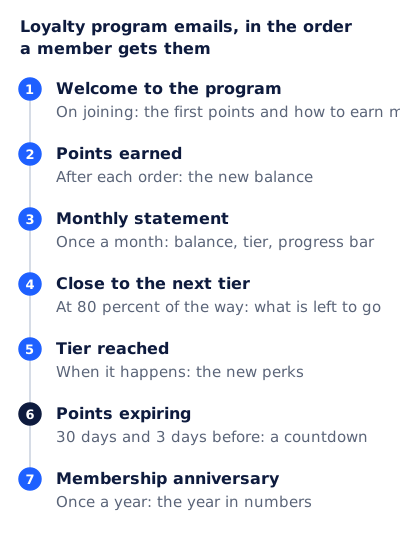
The seven emails at a glance
| Sent when | Member data it needs | Has a deadline? | |
|---|---|---|---|
| Welcome to the program | On joining | Name, starting points, member number | No |
| Points earned | After each order | Points from the order, new balance | No |
| Monthly statement | Once a month | Balance, tier, progress to next tier | No |
| Close to the next tier | At about 80 percent of the way | Points or spend still needed, the tier’s name | Only if the tier year ends soon |
| Tier reached | When the member crosses the line | New tier, its perks | No |
| Points expiring | 30 days and 3 days before | Points at risk, the expiry date | Yes, the member’s own |
| Membership anniversary | Once a year on the join date | The year’s totals | No |
The 80 percent and 30 day marks are starting points, not rules. Pick thresholds a real share of your members reach, and check them against your own program terms.
Loyalty program email examples, one by one
1. Welcome to the program
The first email after someone joins has one job: show that the program already holds something for them. A starting balance, even a small one, does that better than a list of benefits.
- Subject: Welcome to the club, Maya. You have 100 points already
- In the image: the name, the starting points, the member number
- In the text: two ways to earn more, and the first reward’s threshold
2. Points earned
A receipt for points, sent after each qualifying order. Keep it short and lead with the number. If it rides on the order confirmation instead of going out on its own, put the points under the order details, not above them.

3. Monthly statement
This is the email the rest of the program leans on, and the one where a per-member image does the most work. Balance, tier and the distance to the next tier change for every member, every month.
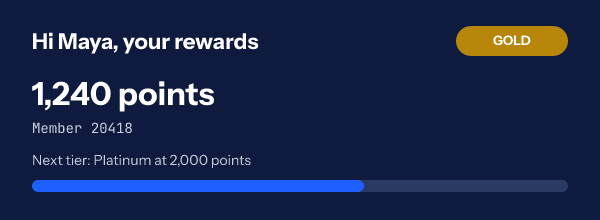
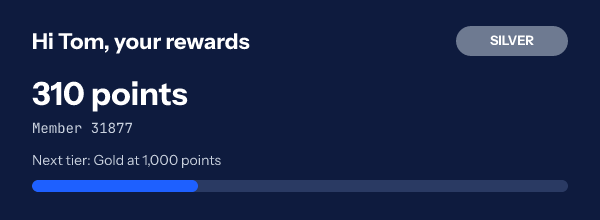

A statement that says only “you have points” gives the member nothing to do. Add the next step: what the balance buys today, or how far the next tier is.
4. Close to the next tier
Sent when a member is most of the way to the next level. The number that matters is what is left: “260 points to Gold” is a target, while “740 points” is just a fact. A progress bar drawn from the member’s own percentage makes the gap visible at a glance.
5. Tier reached
Send it when it happens, not at the next monthly statement. Name the tier, list what changes for the member from today, and give one perk they can use right away. A reward that comes as a code can be drawn into the same image, one code per member, as on the unique coupon codes page.
6. Points expiring
The one loyalty email with a real deadline, and usually a different deadline for each member. Two sends work well: one with time to plan a purchase, and a last reminder.
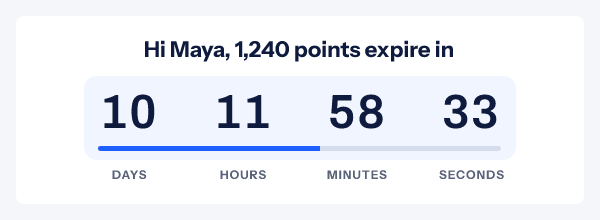
Only count down to a date your program terms actually set. If points do not expire, do not invent a deadline to make the email feel urgent. If every member’s points expire on the same date, such as 31 December, a single timer for the whole list does the job, and the free countdown timer generator makes one without an account: it works for 500 opens, and for 1,000 once you sign in and claim it.
7. Membership anniversary
Once a year, on the date the member joined: points earned, rewards used, the tier they hold now. It is the loyalty version of a year in review email, and it reads best as a few numbers in a picture, with a thank you under it.
Examples by program type
The seven emails fit most programs, but what goes in the image changes with what the program counts.
| Program type | The number in the image | The next step to show |
|---|---|---|
| Points per dollar | Points balance | Points to the next reward |
| Tiered status | Tier and qualifying spend or points this year | What is left to reach or keep the tier |
| Visit or stamp program | Visits this cycle, such as 7 of 10 | Visits to the free item |
| Paid membership | Renewal date and what it has saved them | Days to renewal |
A visit program is the email version of a stamp card. “7 of 10 coffees” with a bar at 70 percent says everything a stamp card says, and it arrives in the inbox.
Is a points balance email transactional or marketing?
It can be either, and the difference decides which rules apply. The FTC’s CAN-SPAM compliance guide lists, among transactional or relationship messages, one that “provides regular, periodic account balance information to the recipient”, and one that “notifies the recipient of a change in their standing” in an ongoing commercial relationship. A plain statement or a tier change can fit there.
Add a promotion and the test changes. The FTC says that when an email has both kinds of content, “the primary purpose of the message is the deciding factor”. It is commercial if the subject line would make the reader think it is an ad, or if the account content does not appear mainly at the beginning. So a statement whose subject reads “Double points weekend starts Friday” is a marketing email with a balance in it. The guide also says “the law views these categories narrowly”. This is a summary of the FTC’s guidance, not legal advice, and other countries have their own rules.
One image per member, not one email per tier
The usual way to send a monthly statement to a tiered program is a segment per tier, each with its own design. The renders above are one template. Here is what it holds:
- Text layers for the greeting, the points and the member number, each bound to a field.
- A badge whose color a rule changes by tier: gold by default, grey when the tier is Silver.
- A progress bar layer bound to the member’s percentage to the next tier.
- An invitation line for non-members, hidden by a rule whenever a tier is present.
- Every member field set to hide the member group when it is missing.
Rules are on the Starter plan and above. The member values come from a recipient list you upload or from the API, on the Growth and Agency plans. Each row gets its own signed address, and that whole address sits in a contact field that your email platform merges in as the image source. Do not put the platform’s own merge tags inside the image address: the address is signed, and a value swapped in afterwards fails the check. The merge tags documentation covers the setup, and the hyper-personalization page goes further into one-to-one data.
One caution on timing. Apple says that “Protect Mail Activity downloads remote content in the background by default”, so for those readers the image is fetched near delivery, not at the moment of reading. A balance is drawn from the values you uploaded, so it is the same either way. Upload fresh values before each send, not after it.
A monthly statement you can copy
Subject: Maya, your November rewards: 1,240 points
Preheader: 760 points to Platinum. Here is what you can use today.

[Image: member card with name, tier badge, points, member number,
 progress bar to the next tier]

Hi Maya,

You earned 180 points in November. Your 1,240 points are enough
for a $10 reward today, or keep going: Platinum is 760 points away.

[Use my points]

Points expire 12 months after they are earned. Your next expiry
is on 30 November, for 120 points.

You are getting this because you are a member of the [Store] club.
[Manage email preferences]
The subject and the first lines of the body are about the account. Keep them that way if you want the email read as a statement, and move any sale to a separate send.
Questions and answers
What should a loyalty program email include?
The member’s own numbers first: points, tier, and what is left to the next reward. Then one thing they can do with it today. A loyalty email without the reader’s balance is a newsletter with a logo on it.
How often should a loyalty program send emails?
The triggered ones go when something happens: joining, earning, reaching a tier, a coming expiry. The scheduled ones are a monthly statement and a yearly anniversary. Check how your list responds before adding more.
Can one email show each member their own points and tier?
Yes. One template draws each member’s values when the email is opened, and rules change the badge color and the wording by tier. The values come from a recipient list or the API.
What happens if a member’s data is missing?
The template decides. Each field can fall back to a default, hide its own layer, or hide the whole member group, and a line inviting the reader to join can show in its place, as in the third render above.
Do points expiry emails need a countdown?
Only when there is a real date. A countdown to each member’s own expiry date is honest and useful. A countdown to a date the program does not enforce is the kind of urgency members learn to ignore.
Sources
Related
- A progress bar GIF for email, and the bar that knows each reader
- Unique coupon codes in email, one single-use code per customer
- The year in review email, with each customer's own year in the picture
- Hyper personalization in email: what can truly differ per recipient
- Email segmentation, written as rules you can copy
Put a countdown in the campaign you are writing now
The free plan covers 5,000 opens a month with no card. Starter is $19 a month for 250,000.