

A bulk certificate generator takes one certificate design and a spreadsheet of names, and produces one certificate per row: the same layout, each with its own name, course, date and ID. The work is in the delivery. You can attach a file to each email, link to a download, or draw each certificate as an image inside the email itself, which is the method this page covers in detail.
Drawing it inside the email is image personalization for email applied to a certificate: no files to generate, store or attach, because each attendee’s certificate is drawn from their row when they open the message. It is a picture of a certificate, not a signed document, and the section on what it is not says exactly where that line sits.
How does a bulk certificate generator work?
Every method has the same three parts: a template with placeholders, a data source with one row per person, and an output. Microsoft’s description of Word’s mail merge fits them all: it “lets you create a batch of documents that are personalized for each recipient”, with “Excel spreadsheets and Outlook contact lists” as “the most common data sources.” What differs is the output and how it reaches people.
| Method | Output | How it reaches each person | Good for |
|---|---|---|---|
| Word or PowerPoint mail merge | A document per row, or printed sheets | Printed, or attached by hand or by a script | Small classes, printed certificates |
| A design tool with a bulk or data merge feature | One image or PDF per row | You download the files and send them | A one-off batch with a designed look |
| A credentialing platform | A hosted credential page, sometimes a verifiable credential | The platform emails a link | Courses where employers check credentials |
| An image drawn at open from a recipient list | One image address per row | Your own email platform, in one send | Webinars and events where you already email attendees |
The first two leave you with a folder of files and a delivery problem. The third solves delivery and verification, at the cost of another platform. The fourth uses the email you were sending anyway.
What should a certificate of completion include?
Whatever generator you use, the columns in your list decide what each certificate can say. A useful set:
| Field | Example | Why it is there |
|---|---|---|
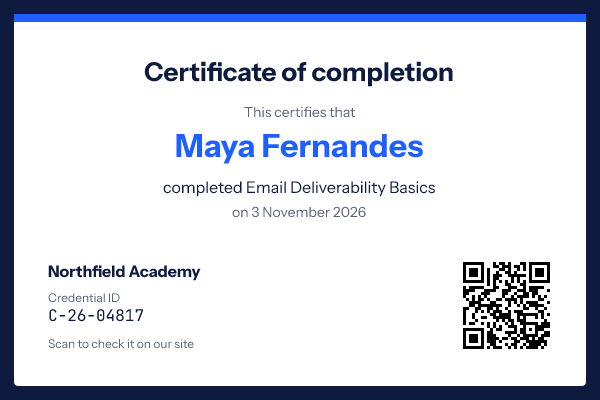
| Full name, as the person wants it printed | Maya Fernandes | The one field people check first, so take it from a form they filled in |
| Course or event title | Email Deliverability Basics | What was completed |
| Completion date | 3 November 2026 | When, in a format your audience reads without thinking |
| Issuer | Northfield Academy | Who stands behind it |
| Credential ID | C-26-04817 | The key to your own record of who earned it |
| Check address | example.com/verify/C-26-04817 | Where anyone can confirm it, as text and as a QR code |
If a professional body sets its own rules for what a certificate must show, such as hours or a sponsor number, follow its current requirements and add those columns.
Attach, link or draw: how to send certificates by email
Attachments. A PDF per person needs a sending tool that attaches a different file to each message, which most marketing platforms do not do. Size is a second limit: Gmail’s help page says “for personal Gmail accounts, the limit is 25 MB”, and above that Gmail “automatically removes the attachment and adds it as a Google Drive link in the email.”
A link to a download page. Works with any platform, but the certificate is one click away, and the moment of receiving it is a button rather than the certificate.
An image in the email. The certificate is the first thing the attendee sees, it needs no attachment, and one send covers everyone. The image is served as a PNG the reader can save or print. The trade-off is the subject of the section on what an image is not.

Certificates in bulk, by email, from one list
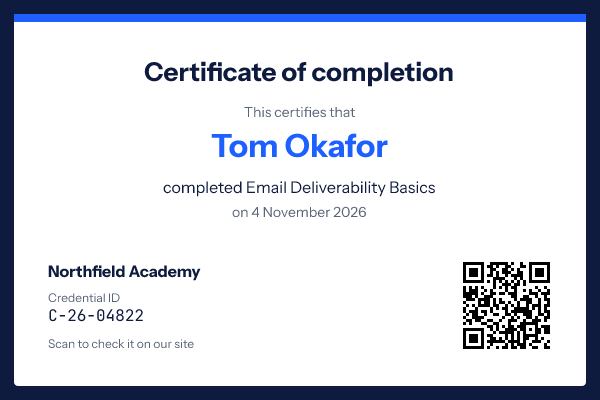
In EmailTimer.app a certificate is a template with text layers for the variable parts ({{full_name}}, {{course}}, {{completed}}, {{cert_id}}) and a QR layer whose content is your check page address with the ID on the end. The steps:
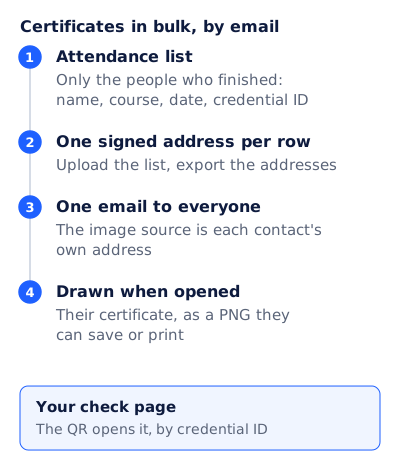
- Attendance list. Only the people who finished: name, course, date, credential ID. Export it from your webinar or course platform as a CSV.
- One signed address per row. Upload the list as a recipient list and export the addresses, one per row. Each address carries an opaque token, and the names stay on the server.
- One email to everyone. Import the address column into your email platform as a contact field. The image source is each contact’s own address.
- Drawn when opened. Each attendee sees their certificate, as a PNG they can save or print.
Recipient lists and per-recipient addresses come with Growth and Agency on pricing. The same list format drives image mail merge for anything else that needs one picture per row.
Details that matter for certificates
- Size. The canvas can be set up to 4,096 px a side. The “Sharp on phones” setting draws a still image at twice its size, up to 2,048 px a side, so a 600 by 400 certificate arrives as 1,200 by 800 pixels: sharp on a phone, but only about 109 pixels per inch across a letter page, so not a print master.
- Names. A title case transform fixes
MAYA FERNANDES, and a truncate transform stops a very long name from running off the page. Names in right-to-left scripts are isolated, so an Arabic or Hebrew name cannot reorder the punctuation around it. - Missing values. Set the name to hide its group, and a row with no name draws no name, rather than a certificate made out to a blank line. Better still, do not put that row on the list.
- The QR code. Keep the check address short, and give it a whole number of pixels per module; the QR code in email guide has the arithmetic. DENSO WAVE’s rule of a “four-module wide margin at all sides” is built into the layer.
- How long it shows. The image is drawn from the list each time the email is opened, so it shows for as long as the list is kept: a recipient record is held for two years or until you delete the list. Each open counts toward your monthly allowance. Ask attendees to save the image if they need it for years.
What an image certificate is not
An image certificate is a picture. Anyone can screenshot it, edit it in a photo app and send it on, and nothing in the image proves otherwise. The W3C’s Verifiable Credentials Data Model v2.0 describes the other kind: “a tamper-evident credential whose authorship can be cryptographically verified.” EmailTimer.app does not issue those, and a certificate image does not replace one.
What makes an image certificate checkable is a record on your side. Give each certificate a credential ID, keep a page on your own site that confirms the name, course and date for that ID, and put the address on the certificate as a QR code and as text. Anyone who doubts a certificate checks your page, not the picture. For a course where employers or licensing bodies check credentials, use a credentialing platform, and send the image only as the welcome copy.
A webinar certificate email you can copy
Send: within a day of the session, to attendees only
Subject: Your certificate for Email Deliverability Basics
Preheader: Maya, thank you for joining on 3 November.

[Image: the certificate, drawn from her row]
Alt text: Certificate of completion for Maya Fernandes,
Email Deliverability Basics, 3 November 2026, ID C-26-04817

Save it: press and hold the image (phone) or right-click it (computer).
Check it: example.com/verify/C-26-04817   (live text)

Missed part of the session? The recording: {link}
Next course: {title, date, link}
Send a separate, plainer email to people who registered but did not attend; a certificate should only reach people who earned it. The event reminder email guide covers the emails before the session, and variable data email covers the same one-row, one-version idea for print teams.
Questions and answers
What is a bulk certificate generator?
A tool that fills one certificate design from a spreadsheet, producing one certificate per row with each person’s name, course, date and ID. The output can be files you send, hosted pages, or images drawn inside an email.
Can I email certificates without attaching files?
Yes. Draw each certificate as an image in the email from a recipient list. One send reaches everyone, and each person sees their own.
Is an image certificate secure?
No more than any picture. Pair it with a credential ID and a check page on your own site, and use a credentialing platform where tamper-evident credentials are required.
Can attendees download or print the certificate?
Yes. The image is a PNG they can save from the email; with “Sharp on phones” on, a 600 by 400 design is drawn at 1,200 by 800 pixels.
What do I need on the plan?
Recipient lists and per-recipient image addresses are on Growth and Agency. Current prices are on pricing.
Sources
- Use mail merge for bulk email, letters, labels, and envelopes (Microsoft Support), read on 4 November 2026
- Send attachments with your Gmail message (Gmail Help), read on 4 November 2026
- Verifiable Credentials Data Model v2.0 (W3C Recommendation, 15 May 2025), read on 4 November 2026
- QR Code Points for generating (DENSO WAVE), read on 4 November 2026
- Photo by Karolina Grabowska (Kaboompics) on Pexels
- Photo by KATRIN BOLOVTSOVA on Pexels
Related
Put a countdown in the campaign you are writing now
The free plan covers 5,000 opens a month with no card. Starter is $19 a month for 250,000.