Newsletter examples, five formats and the parts that make one work
By Danish Mohammed. 7 min read
Good newsletter examples share a shape more than a look: a header that says which issue this is, one lead story worth opening for, a few short items, at most one module with a deadline, and a footer that explains why the reader gets it. This page sets out the five common newsletter formats, the parts each one needs, and the rules mailbox providers apply to newsletters.
First, a plain statement about what is not here. EmailTimer.App keeps a library of sixteen real brand emails, each shown as the brand sent it with a timer added. All sixteen are campaign emails: sales, launches, events, cart and stock reminders, a trial ending, a birthday, a loyalty push, a shipping cutoff and holiday promotions. None of them is a newsletter. Rather than invent newsletters and present them as real, this page describes the formats, and shows the two library emails a newsletter can most usefully learn from, labelled for what they are.
What is an email newsletter, and how is it different from a campaign email?
A newsletter is a regular email, sent on a schedule, whose main job is to be worth reading. A campaign email is sent when there is something to sell or announce, and its main job is one action.
| Newsletter | Campaign email | |
|---|---|---|
| When it goes out | On a schedule: weekly, monthly | When there is news, a sale or a deadline |
| What it contains | Several items | One offer or one announcement |
| How many buttons matter | Several, one per item | One |
| What success looks like | People keep opening and clicking over months | People act on this one email |
| Where a deadline belongs | In one module, if at all | Often the whole point |
Most newsletters still sell something, and that is fine. The difference is proportion. A newsletter that is all offers reads as a catalogue, and readers treat it as one.
Five newsletter formats, and what each one needs
These are five common formats. Pick one per newsletter; mixing three formats in one issue is how an issue gets long without getting better.
| Format | What a typical issue holds | What makes it work | Typical send rhythm |
|---|---|---|---|
| Curated digest | Five to ten links to other people’s work, each with one or two lines on why it matters | The editor’s judgment. The summary must say something the headline does not | Weekly |
| Editorial letter | One essay or argument by one writer | A voice and a point of view worth returning for | Weekly or fortnightly |
| Company or product update | What changed, what shipped, what is coming | Specifics: dates, names, what the reader can now do | Monthly |
| Retail roundup | New arrivals, a story behind a product, a member offer | One lead product with a reason, not a grid of everything | Weekly or monthly |
| Community or event digest | Upcoming events, recordings of past ones, member news | Dates, times and time zones written in full | Monthly, plus reminders |
The rhythm column is a starting point, not a standard. The right frequency is the one you can keep up with a lead story that deserves the slot. A monthly issue with something to say beats a weekly one padded to fill the week.
What are the parts of a good email newsletter?
Whatever the format, an issue that reads well has the same five parts in the same order.
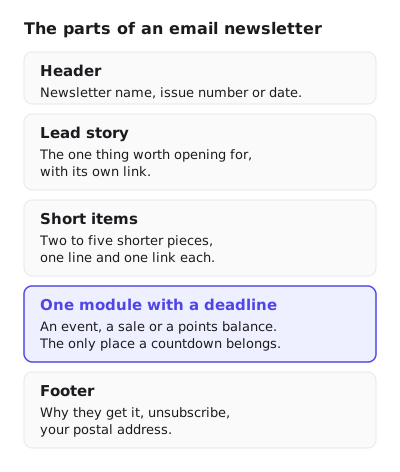
- Header. Newsletter name, issue number or date. Readers who get several newsletters need to know which one this is before they decide to read.
- Lead story. The one thing worth opening for, with its own link. If you cannot name it, the issue is not ready.
- Short items. Two to five shorter pieces, one line and one link each. These reward the readers who scroll, without making the lead story compete.
- One module with a deadline. An event, a sale or a points balance. The only place a countdown belongs, and only when the deadline is real.
- Footer. Why they get it, unsubscribe, your postal address. Two of those three are legal or provider requirements, covered below.
The closest real email in the library: LEGO’s holiday email
LEGO’s members early access email is a promotion, not a newsletter. It is the closest thing in the library to one, because it is built from separate modules that each stand on their own: a lead offer (“Jingle bricks”, marked Early Access for Members), two featured sets with their own buttons, a Membership Tip, the reader’s points total, and two rewards to redeem.

What a newsletter can borrow from it:
- A label above the lead. “Early Access for Members” tells the reader why they got this before any product appears. A newsletter’s equivalent is the issue name and date.
- One button per module. Every section has its own Shop now or Redeem now, so a reader who skips the first item still has a way in.
- A non-selling module. The Membership Tip is advice, not an offer. Mixing a useful item between products is what stops a long email reading as a catalogue.
- The reader’s own number. “Your LEGO Insiders points total is” followed by their balance is personal in a way the rest of the email is not.

The countdown was added for illustration inside the Jingle bricks panel, where the members window is the reason to act. In a newsletter that would be the one module with a deadline.
Where does a countdown fit in a newsletter?
In one module, when that module has a real end time, and nowhere else. A newsletter is read for its content; a clock in the header or beside every item turns it into a sales email.

The natural fit is an event. Miro’s Canvas 26 reminder is an event campaign, not a newsletter, but its top section is exactly what an event module in a newsletter should hold: format, date and time on one line (Streaming live, Tuesday, May 19, 2026, 9am PT), a one-line question, one button, and the countdown under it.

Two practical points for a timer inside a newsletter:
- The deadline must be the same for every reader, because a newsletter goes to the whole list at once. That is a fixed deadline timer, the simplest kind, and it needs one image address for everyone.
- Set what it shows afterwards. People read newsletters late, sometimes days later. An image that says the event has passed, or links to the recording, is better than a clock stuck at zero.
If your newsletter runs on beehiiv or Substack, check what your platform accepts first: countdown timers for beehiiv and Substack explains that beehiiv takes custom HTML on some plans and Substack takes none. Anywhere that accepts an image from a URL, you can make a timer without an account in the countdown timer generator.
What rules does a newsletter have to follow?
A newsletter sent to many people is bulk email in the eyes of the mailbox providers, and commercial email in the eyes of US law if its main purpose is to promote something.
| Rule | Who sets it | What it says |
|---|---|---|
| One-click unsubscribe | Google, for senders of more than 5,000 messages a day to Gmail accounts | “Marketing messages and subscribed messages must support one-click unsubscribe” |
| Spam rate | “Keep spam rates reported in Postmaster Tools below 0.10% and avoid ever reaching a spam rate of 0.30% or higher” | |
| Unsubscribe speed | Yahoo, for bulk senders | “Honor unsubscribes within 2 days” |
| Postal address | FTC, under CAN-SPAM | “Your message must include your valid physical postal address” |
| Opt-out speed | FTC, under CAN-SPAM | “You must honor a recipient’s opt-out request within 10 business days” |
Whether CAN-SPAM covers a particular newsletter depends on its primary purpose. The FTC’s guide says that for a message mixing content types, “the primary purpose of the message is the deciding factor”, and it does not discuss newsletters directly. Treating a newsletter that promotes products as commercial is the safe reading.
Readers who stop reading are the other risk. Google suggests you “Consider unsubscribing recipients who don’t open or read your messages.” The re-engagement email guide covers how to ask them before you remove them.
Questions and answers
What should be included in a newsletter?
A header with the name and issue date, one lead story, a few short items, at most one module with a deadline, and a footer with why the reader gets it, an unsubscribe link and your postal address.
What is a good newsletter format?
One format per newsletter: a curated digest, an editorial letter, a company update, a retail roundup or an event digest. Choose the one you can fill with a lead story every issue.
How often should you send a newsletter?
As often as you can keep a lead story worth the slot. Weekly and monthly are common, but no rule sets the right frequency for every list.
Are there real newsletter examples on this site?
No. The site’s library of real brand emails holds sixteen campaign emails and no newsletters, so this page shows the two that a newsletter can learn from and labels them as campaigns. The full library is in the countdown timer email examples gallery, and email marketing examples annotates ten of them.
Can a newsletter have a countdown timer?
Yes, in one module with a real deadline, such as an event or a members sale. Use a fixed deadline, because the issue reaches every reader at the same time, and set an image for after it ends.
Sources
Related
Put a countdown in the campaign you are writing now
The free plan covers 5,000 opens a month with no card. Starter is $19 a month for 250,000.
These emails belong to the brands that sent them and are credited to each one. We added our timers to show how they look in real campaigns. Brand owners can ask us to remove their email at privacy@emailtimer.app, and we will do it the same day.