

Lifecycle email marketing is sending each customer the email that fits where they are with you: just subscribed, first order placed, buying again, going quiet, or gone. Each stage has a trigger that moves a person into it and one job its emails have to do. The emails run as automated flows started by what each person does, while campaigns go out on dates you choose.
It is the planning layer of email automation. The single flows have pages of their own; this one decides which stages you need, which flow to build first, how flows pass a person from one to the next without sending twice, and what to measure at each stage. Subscription businesses add two stages to the usual five: the trial and the renewal.
What are the stages of the customer lifecycle?
Five stages cover a store, and seven cover a subscription. Each row is a stage, the event that moves a person into it, the one job of its emails, and the page on this site that covers that email in depth.
| Stage | Trigger | The one job of its emails | In depth |
|---|---|---|---|
| Subscribe | Joins the list or creates an account | A first order or a first real use | Welcome email |
| First purchase or activation | First order, or the first key action in the product | Make the first one go well | Shipping confirmation email |
| Repeat | A second order | The next order, at the right time | Email segmentation |
| At risk | Past their usual gap between orders, with no new order | A reason to come back that is theirs | Re-engagement email |
| Lapsed | No order and no click in a long window | Back, or a clean exit | Re-engagement email |
| Trial | Trial starts | The key action before it ends | Trial and renewal timers |
| Renewal | A set number of days before renewal or card expiry | No surprises: the date, the amount, how to change it | Trial and renewal timers |
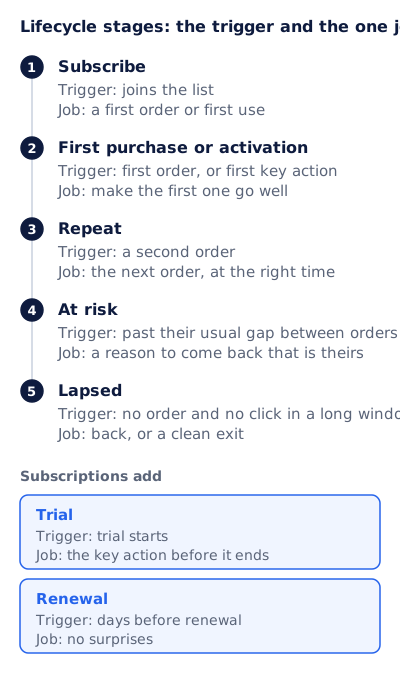
The trigger and the one job at each stage
Subscribe. The welcome flow starts the moment someone joins and ends at a first order or first use, whichever the business needs. The welcome email guide has a template and a three-email series, and the drip campaign guide covers spacing and exit rules for any sequence timed from a signup.
First purchase or activation. Two flows meet here. One recovers the first order that nearly happened: the abandoned cart email goes to a known shopper who left items behind (browse abandonment is its quieter cousin), and it can fire in any stage. The other makes the first order go well: the order confirmation, the shipping confirmation email when the parcel leaves, then a review request or a product that goes with the first one. For software, activation is the first key action, such as the first project created, and every onboarding email points at it.
Repeat. The second order is the trigger, and the job is the third: the next order at the right time. The right time is that customer’s usual gap between orders, or how long the product lasts. That is a purchase segment, and email segmentation shows how to write it as a rule.
At risk. The trigger is an absence: longer than this customer’s usual gap since the last order. The job is a reason to come back that belongs to them, such as points they have earned, a reorder of what they bought, or a tier they are close to. A site-wide discount is the least specific version, because everyone gets the same one.
Lapsed. No order and no click in a long window. The job is a decision, back or out. Google’s sender guidelines ask senders to “Periodically send messages to confirm that recipients want to stay subscribed”, and the re-engagement email guide writes that sequence. Define this stage and the one before it by clicks and orders, never opens: Apple’s Mail Privacy Protection “downloads remote content in the background by default”, which records opens nobody made.
Trial. The trial start is the trigger, and the job is the key action before the trial ends. Every user’s end date is different, so a trial email that names one date for everyone is wrong for nearly all of them.
Renewal. A set number of days before the renewal, or before the card on file expires. The job is no surprises: the date, the amount, and how to change or cancel. The FTC’s CAN-SPAM guide counts a message that “notifies the recipient about a change in the terms or features of a membership, subscription, account” as transactional or relationship content. An upgrade offer in the same email is a different matter, and the order confirmation email guide explains how US and UK rules treat a message that mixes the two.
A lifecycle map you can copy
Keep the stage in one field per person, set by rules checked in a fixed order, so nobody is in two stages at once.
Stage, checked top to bottom; the first rule that matches wins
  1. Lapsed       No order in 365 days AND no click in 180 days
  2. At risk      Last order more than 1.5 x their usual gap ago
  3. Repeat       Placed order at least 2 times
  4. First order  Placed order exactly 1 time
  5. Subscribed   Placed order 0 times
Subscriptions add
     Trial        Trial is active
     Renewal      Renewal date within the next 30 days

One flow per stage   Welcome, post-purchase, replenishment, win back, re-engagement
Every flow exits on  A change of stage, the flow's goal, or an unsubscribe
Same-day priority    Transactional, then cart, then trial and renewal,
                     then welcome, repeat, at risk, lapsed
The numbers are a starting point, not a standard. A store that sells coffee and one that sells sofas have very different usual gaps, which is why the at-risk rule is relative to each customer.
Which lifecycle flow should you build first?
The one where the most value falls out of a stage today. You can estimate it for each stage from three numbers in your own data: the people entering the stage each month, the share who already reach its goal with no flow at all, and what one success is worth.
Value at stake a month = people entering × (1 − share already succeeding) × value of one success
It is a ceiling, not a forecast, but it ranks the stages honestly. Here it is filled in for an imaginary store; replace every number with yours.
| Stage | Entering a month | Already reach the goal | Value of one success | Value at stake a month |
|---|---|---|---|---|
| Subscribe | 2,000 new subscribers | 10% order within 30 days | $25 margin | $45,000 |
| First purchase (carts left) | 1,200 carts from known shoppers | 15% come back unprompted | $30 margin | $30,600 |
| At risk | 500 customers | 30% order again unprompted | $25 margin | $8,750 |
| Lapsed | 300 customers | 5% come back unprompted | $25 margin | $7,125 |
For this store, the welcome flow comes first and the cart flow second. Two practical checks can reorder the list. A flow needs its trigger data: a cart flow needs a shopper you can identify before checkout, and an at-risk flow needs order dates for each customer. And order and shipping confirmations often exist already in the store platform, so read what they say before building new ones. Once a stage is chosen, the drip campaign guide gives a length and spacing for its sequence.
How do lifecycle flows hand off without sending twice?
Picture one person without any hand-off rules. They join the list and the welcome flow starts. Two days later they leave a cart and the cart flow starts as well. The next day they buy. That week they receive welcome email three, cart email two, and a post-purchase email, and the cart email asks them to finish an order they have already placed.
Four rules prevent it:
- One stage per person. Set the stage with the map above and filter every flow on it. Entering a new stage ends the flows of the old one.
- Exit on the goal, checked before each email. A purchase ends the cart flow and the welcome offer, even if it happens between two emails.
- A same-day priority. Transactional email first, then anything with a deadline (the cart, the trial end, the renewal), then everything else.
- A cap on marketing email, with transactional email outside it.
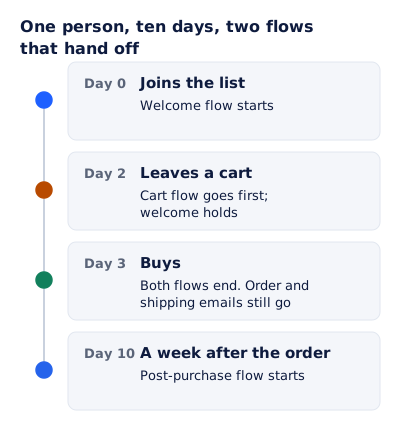
With the rules, day 0 starts the welcome flow. On day 2 the cart flow goes first and the welcome email due that day holds. On day 3 the purchase ends both flows, and the order and shipping emails still go. On day 10, a week after the order, the post-purchase flow starts.
Platforms do part of this for you, and the details matter. Klaviyo’s Smart Sending skips a marketing message to anyone emailed recently: “By default, the email Smart Sending window is 16 hours”, and transactional messages are “never skipped by Smart Sending”. But “Messages skipped due to Smart Sending are not rescheduled automatically”, and “Smart Sending limits sends, not the number of times a profile can enter a flow.” A cap decides which email wins by timing, not by importance, so the priority belongs in your flow filters. Re-entry is a separate setting, where “No re-entry” is how profiles “enter only once”.
Rule four has a legal reason too. The FTC’s CAN-SPAM guide lists what counts as transactional or relationship content, starting with content that “Facilitates, completes, or confirms a commercial transaction that the recipient already has agreed to” and including content that “delivers goods or services as part of a transaction that the recipient already has agreed to”. Such a message “is otherwise exempt from most provisions of the CAN-SPAM Act”. An unsubscribe has to end the welcome and win back flows, and the FTC says “You must honor a recipient’s opt-out request within 10 business days”, but it does not stop a shipping notice for an order the customer placed.
Dated moments: trials, renewals and points that expire
Some stages end on a date that belongs to one customer: the trial that ends 14 days after their signup, the plan that renews on their billing day, the points that lapse on a date set when they were earned. A single date in the email is right for almost nobody. Each reader needs their own.
EmailTimer.app draws that as an image when the email is opened: a countdown to the reader’s own deadline, beside their name, a points balance or a progress bar. The image below comes from one template, and everything in it is Maya’s.
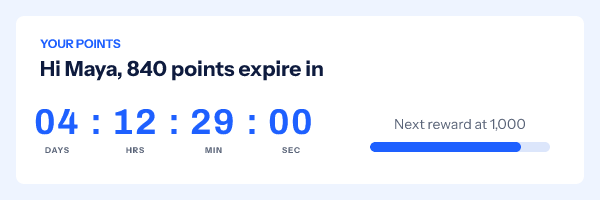
Each value travels in a signed address per recipient, minted through the API or from a recipient list on the Growth and Agency plans (pricing has the tiers). Trial and renewal timers walks through both routes for trial ends, renewals and memberships. One rule before any of it: count down only to a date that is real. If the points do not lapse on that day, leave the clock out.
What to measure at each stage
| Stage | Main measure | Watch as well |
|---|---|---|
| Subscribe | Share of new subscribers who order or activate within 30 days | Unsubscribes per welcome email |
| First purchase or activation | Share of carts recovered; support contacts per 100 orders | Complaints about order emails |
| Repeat | Share of first-time buyers who order again within the usual gap | Time between orders |
| At risk | Share who order within 30 days of entering the stage | Discount cost per customer won back |
| Lapsed | Share who click to stay or buy | Spam rate in Google Postmaster Tools after the rest are suppressed |
| Trial | Share of trials that become paid | Share that reach the key action |
| Renewal | Share that renew | Refund requests in the week after renewal |
Added up over a year, these stages produce the number lifecycle marketing exists for: what a customer is worth over time, their lifetime value. Each main measure needs a comparison, because some of these people would have bought anyway. The cleanest one is a group that gets no email. Braze’s documentation for its Global Control Group describes the idea: a percentage of all users “who shouldn’t receive any campaigns or Canvases”, a group it says “should be no smaller than 1000 users”. For a single flow, the same idea is a random share of entrants who skip the emails; compare their goal rate with everyone else’s.
Questions and answers
What is the difference between lifecycle marketing and a drip campaign?
A drip campaign is one timed sequence started by a trigger. Lifecycle marketing is the plan above it: which sequences exist, which stage each person is in, and how they move between stages. Each stage usually runs one drip-style flow.
What are customer lifecycle emails?
The emails a customer gets because of where they are with you: a welcome after signing up, a shipping notice after the first order, a reorder reminder, a win back email after a long absence, and for subscriptions a trial or renewal reminder.
How many lifecycle stages should I plan for?
Five cover most stores: subscribe, first purchase, repeat, at risk and lapsed. Subscriptions add trial and renewal. Build the stage your worksheet ranks highest first and add one flow at a time.
Are lifecycle marketing emails transactional?
Some are. Order and shipping confirmations are transactional under the FTC’s CAN-SPAM guide, and so is a notice of a change to a subscription’s terms. Welcome, reorder and win back emails are marketing, with the opt-out rules that come with it.
Sources
- Email sender guidelines (Google Workspace Admin Help), read on 3 November 2026
- Mail Privacy Protection and Privacy (Apple Legal), read on 3 November 2026
- CAN-SPAM Act: A Compliance Guide for Business (Federal Trade Commission), read on 3 November 2026
- Understanding Smart Sending in Klaviyo (Klaviyo Help Center), read on 3 November 2026
- Troubleshooting why a profile is scheduled in a flow multiple times (Klaviyo Help Center), read on 3 November 2026
- Global Control Group (Braze Docs), read on 3 November 2026
- Photo by Vitaly Gariev on Pexels
Related
Put a countdown in the campaign you are writing now
The free plan covers 5,000 opens a month with no card. Starter is $19 a month for 250,000.