

Email segmentation is splitting your email list into groups by a rule, such as “bought twice in the last 180 days” or “no click in 90 days”, and sending each group a different email, or no email at all. A segment decides who gets a message and when. Personalization decides what one message says to the person reading it.
In email automation, segments do two jobs: they decide who enters a flow, and they keep people out of flows that no longer fit them. This guide writes each segment type as a rule you can type into a segment builder, then covers deliverability, opens, how small a segment can get, and when one email with changing content does the work of several segment sends.
What is the difference between segmentation and personalization?
Segmentation chooses the audience. Personalization changes the content inside one email. Mixing them up is how a program ends up sending near-identical campaigns that differ by one headline.
| Segmentation | Personalization | |
|---|---|---|
| The question it answers | Who gets this email, and when | What this email says to this reader |
| What it works on | A group, defined by a rule | One recipient |
| Can it stop an email from being sent? | Yes. Leaving people out is half its job | No. Everyone in the audience still gets the email |
| Example | Repeat buyers see the new range a day before everyone else | The email greets each buyer by name and shows their points |
The third row is the one to remember. Content that changes per reader cannot un-send an email to someone who should not have had it. Exclusion belongs to segments. Email personalization covers what can change inside one email, from a first name to a product chosen by past orders.
Six types of email segmentation, written as rules
A type name such as “behavioral” cannot be typed into a segment builder. A rule can. Builders share the same parts: a condition (something a person did, or a property they have), a timeframe, and AND or OR to join conditions. Klaviyo’s segment conditions reference, for one, lists “What someone has done (or not done)” and “Properties about someone”, with timeframes such as “In the last” and “Between dates”. Its segments “are dynamic and will grow and shrink based on customer behavior”, while lists “are static”.
Here are six email segmentation examples built from those parts. Change the numbers to fit how often your customers buy.
| Type | The rule, as you would type it | What it is for |
|---|---|---|
| Behavior | Viewed a product in Running at least 2 times in the last 14 days, AND placed an order 0 times in the last 14 days | A follow-up about the running shoes they kept looking at |
| Purchase | Placed an order exactly 1 time over all time, AND placed an order between 30 and 90 days ago | Asking for a second order while the first is still fresh |
| Lifecycle stage | Subscribed in the last 30 days, AND placed an order 0 times over all time | New subscribers who have not bought yet |
| Engagement | Clicked any email at least 1 time in the last 90 days | The people who get your full sending schedule |
| Location | Country in the shipping address equals Germany | Delivery cut-offs, local holidays, a store event |
| Preference | Topics chosen at signup contains Menswear, AND frequency chosen equals Weekly | Sending what they asked for, as often as they asked for it |
Lifecycle email marketing arranges the lifecycle segments into stages with one flow each, and shows how the flows hand people to each other.
A segment definition you can copy
Write the definition down before you build it, including what it excludes and which emails use it. A segment nobody can explain six months later gets mailed by mistake.
Segment:   Second order window
Include:   Placed order exactly 1 time over all time
     AND   Placed order at least 1 time between 30 and 90 days ago
     AND   Can receive email marketing
Exclude:   Requested a refund in the last 30 days
     OR    Is in the segment "Inactive: no click in 180 days"
Type:      Dynamic, so a second order takes people out of it
Used by:   Second order flow; the monthly new arrivals email
Reviewed:  Every quarter, by whoever owns the flow
Why do engagement segments matter for deliverability?
Because Gmail and Yahoo judge a sender partly by how recipients respond, and both say so in their own guidance.
Google’s email sender guidelines tell senders to “Consider unsubscribing recipients who don’t open or read your messages” and to “Periodically send messages to confirm that recipients want to stay subscribed.” The same page sets a ceiling on complaints: “Keep spam rates reported in Postmaster Tools below 0.10% and avoid ever reaching a spam rate of 0.30% or higher.”
Yahoo’s Sender Hub says “The best way to ensure your messages are delivered is to send timely and relevant email to an active and engaged audience,” and warns that “Sending email to users who are not reading them, or who report them as spam, will harm your delivery metrics and reputation.” It also asks senders to “Honor the frequency of the list’s intent”, which is a preference segment by another name.
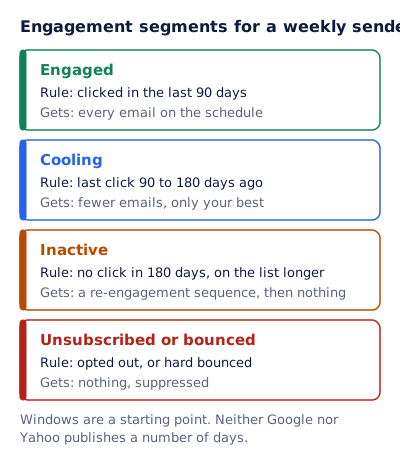
Read together, those lines ask for engagement segments treated differently, not one list that gets everything. For a weekly sender, a starting point:
| Segment | Rule | What it gets |
|---|---|---|
| Engaged | Clicked in the last 90 days | Every email on the schedule |
| Cooling | Last click 90 to 180 days ago | Fewer emails, only your best |
| Inactive | No click in 180 days, and on the list longer than that | A re-engagement sequence, then nothing |
| Unsubscribed or bounced | Opted out, or hard bounced | Nothing. Suppressed |
Windows are a starting point. Neither Google nor Yahoo publishes a number of days, so set them from how often your customers buy: a daily deals list can call someone inactive sooner than a store that sells mattresses. The re-engagement email guide writes the sequence the inactive segment gets, and what to do with the people who never answer it.
Why opens stopped being a reliable segment signal
The engaged rule above says “clicked”, not “opened”, on purpose.
Apple’s Mail Privacy Protection page says that “Protect Mail Activity downloads remote content in the background by default”, “regardless of whether you engage with the email”. The pixel that records an open is remote content, so an Apple Mail reader with the setting on can register an open for a message they never looked at. Apple’s support page states the effect plainly: the feature “prevents senders from seeing if you’ve opened the email they sent you.” Google says it “doesn’t track open rates”.
That breaks two kinds of segment.
Engagement by opens. “Opened in the last 90 days” can keep Apple Mail readers who have not read anything for a year, so they never reach the inactive segment or its re-engagement sequence.
Location by opens. Apple says the feature “hides your IP address so senders can’t link it to your other online activity or determine your exact location.” Gmail’s help page says “Senders can’t use image loading to get information about your computer or location.” A segment built from where emails were opened can end up as a segment of proxy servers.
Build engagement rules from clicks, orders, replies and logins, which a background download cannot trigger, and location rules from the address the customer gave you. Email open rate explains how an open is recorded and what Apple’s change did to the number.
How small can an email segment be?
As small as one person, if the email has to be different for them. The limit is not a subscriber count but two costs: building another email, and telling whether it worked.
The second cost is arithmetic. Say your emails get a 2% click rate (an example, not a benchmark). Even if nothing about the email changes, the rate you measure on one send moves by chance, and for small groups it moves a lot:
| Segment size | Expected clicks at 2% | Where the measured click rate lands 95 times in 100 |
|---|---|---|
| 500 | 10 | 0.8% to 3.2% |
| 1,000 | 20 | 1.1% to 2.9% |
| 5,000 | 100 | 1.6% to 2.4% |
| 20,000 | 400 | 1.8% to 2.2% |
The ranges use the usual normal approximation: the expected clicks, plus or minus 1.96 standard deviations. At 500 people, a click rate that seems to double, from 1.5% to 3%, may be chance alone.
So split by reason, not by size:
- Split off a separate email when the difference is why the email exists: a different language, a product they own, a deadline that is theirs. Size does not matter then.
- Do not split when the only difference is one headline, image or offer. Use one email with conditional content, below.
- Do not judge a small segment on one send. Add its results up across sends, or test only where each group has a few thousand people.
When does one email replace several segment sends?
When every group should get the email at the same time, and only part of it differs. The segments then become conditions inside one email instead of separate sends.
| What differs between the groups | Separate segment sends | One email with conditional content |
|---|---|---|
| Whether they should get it at all | Yes. Only a segment can leave people out | No |
| When it goes, or how often | Yes | No |
| The whole message: its purpose and subject line | Yes | Rarely worth it |
| One block: a headline, a hero image, an offer, a product | Works, but is slower to build and report | Yes |
| Something that should change after sending, such as a sale that opens at 9am | No. The email is already sent | Only an image drawn when it is opened |
Email platforms build the block-level version natively. Mailchimp’s conditional merge tags “help you control who sees what in your email” and “work with audience fields and groups”. Klaviyo’s show/hide logic shows “a particular block or section in an email to certain recipients”, though its logic builder reads profile data and “cannot reference event data”. Dynamic content in email covers how those blocks are put together.
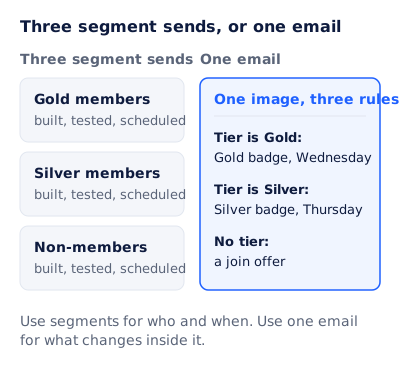
Picture a member sale. Early access opens on Wednesday for Gold members and on Thursday for Silver members, and non-members get a join offer. As three segment sends, that is three emails, each built, tested and scheduled. As one email, it is one image with three rules: tier is Gold shows a Gold badge and Wednesday, tier is Silver shows a Silver badge and Thursday, and no tier shows a join offer. Use segments for who and when. Use one email for what changes inside it.
A conditional block is decided when the email is sent. An image can be decided later, when it is opened. EmailTimer.app draws each image at the moment of opening and applies rules to it: a rule reads the time of opening, a field in the subscriber’s signed address, the country or the device, and it can show or hide a layer, change its text, image or color, or switch to another variant. The two pictures below are one template sent to every member. Each address carries that member’s tier and early access time, so Maya and Tom see different badges and clocks in the same email.
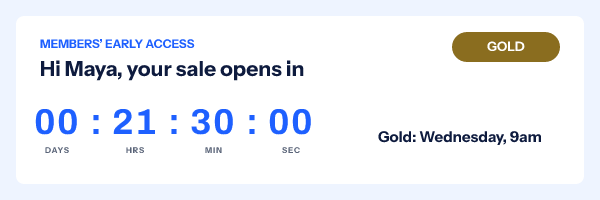
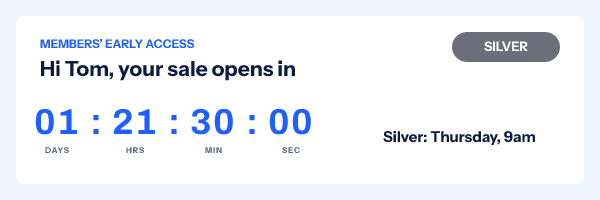
Two limits. Country and device are often hidden: behind Gmail’s image proxy or Apple Mail Privacy Protection the request comes from the proxy, so the image sees the proxy’s country and device, or none. A rule that cannot tell matches nothing and the image keeps its default, so anything that matters belongs in a field from your own data. And rules are on the Starter plan and up, while values that differ per subscriber travel in signed addresses minted through the API or from a recipient list, on Growth and Agency. Pricing lists the plans.
Questions and answers
What is email list segmentation?
Dividing a list into groups by rules, such as purchase history, engagement or location, so each group gets the emails that fit it. “Email list segmentation” and “email segmentation” mean the same thing.
What are the main types of email segmentation?
Behavior, purchase, lifecycle stage, engagement, location and preference. Purchase segments can be scored by recency, frequency and monetary value, known as RFM. Demographic segments, such as job title, are another type when you hold reliable data.
How do you segment an email list?
Pick one decision the segment should change, such as who gets the weekly email. Write the rule with a condition, a timeframe and its exclusions, build it as a dynamic segment so people move in and out as they act, and check its size before writing a separate email for it.
Is segmentation the same as dynamic content?
No. Segmentation decides who gets an email and when. Dynamic content changes a block inside one email for each reader, which suits a send where everyone gets the email but one part differs.
Sources
- Email sender guidelines (Google Workspace Admin Help), read on 3 November 2026
- Sender Best Practices (Yahoo Sender Hub), read on 3 November 2026
- Mail Privacy Protection and Privacy (Apple Legal), read on 3 November 2026
- Use Mail Privacy Protection on iCloud.com (Apple Support), read on 3 November 2026
- Turn images on or off in Gmail (Gmail Help), read on 3 November 2026
- Segment conditions reference (Klaviyo Help Center), read on 3 November 2026
- Understanding the difference between segments and lists (Klaviyo Help Center), read on 3 November 2026
- How to show or hide template blocks and sections based on dynamic variables (Klaviyo Help Center), read on 3 November 2026
- Use Conditional Merge Tags (Mailchimp Help), read on 3 November 2026
- Photo by Vitaly Gariev on Pexels
- Photo by Christopher Finklea on Pexels
Related
Put a countdown in the campaign you are writing now
The free plan covers 5,000 opens a month with no card. Starter is $19 a month for 250,000.