
To draw a Braze user’s own attributes into a designed email image, the way personalized images in email work, put the image link in your message and let Liquid fill each field at send with the url_param_escape filter, as in {{${first_name} | url_param_escape}}. Use url_param_escape, not url_escape: the second leaves & as it is, so “Fit & Fab Studio” arrives cut and shows your fallback.
The examples on this page come from Stride, an invented fitness app. Its weekly email opens with a banner that greets each user by name, counts their streak and names their home studio. In Braze those values are first_name, a standard attribute, and two custom attributes, streak_days and home_studio. The template calls the last one studio.
Dynamic images in Braze without an outside service
Braze documents four ways to change an email image per user. Each one picks or makes a whole file. None of them, as Braze describes them, writes a user’s own words into a picture.
Liquid in the image link. Braze lets you personalize “link destinations and content for each user who receives your message by adding Liquid variables to the URLs for buttons, links, images, and videos.” Point an image at https://cdn.stride.example/badges/{{custom_attribute.${tier}}}.png and each user loads the badge file for their tier. You design every file in advance, which works for five tiers and not for a million first names.
Catalogs. “Catalogs access data from imported CSV files and API endpoints to enrich your messages,” and a column of image links can feed an image. Braze’s own example is {% catalog_items Games 1234 %}{{ items[0].image_link }} inside the image source. The drag-and-drop Product block renders catalog products as tiles, up to 12 from a fixed selection or up to 24 from a Canvas eCommerce trigger. Each product gets its own picture, and none of them carries the user’s name.
Connected Content. Braze says Connected Content “executes when the message is rendered”, so your own service can hand back a different image link per user at send. Something at that link still has to make the picture.
Generated images. Braze can generate images for your media library with GPT Image 2.0 through BrazeAI Operator: four variations per request, and 10 requests a day for the whole company. You get one image, made before the send, that every user sees.
Braze’s partner directory also lists visual and interactive content vendors, among them Movable Ink and NiftyImages, for pictures made outside Braze.
When you need a rendered image
The options above choose between pictures that already exist. A rendered image is drawn when the email is opened, with the value Braze filled at send set in your type and inside your layout: “Jordan, 42-day streak” in a badge, over your own background, beside your logo. It is pixels, so it reads the same in Gmail and in Outlook. It can also hold a live countdown in the same picture.
You build it in the EmailTimer.app dashboard with your own uploads for the background, the logo and any photos. Fields your email platform fills work on every plan, Free included, and pricing has the open allowances.
The personalized image tag for Braze
A personalized image link has two halves. Everything before sig is signed: the template, the version, and fill, the list of fields Braze may fill. Nobody can change that part. After the signature come Braze’s values, one per listed field in the same order, then fill_end=1:
https://img.emailtimer.app/i/k7mQ2pXd.png?w=w_8ha3fq&v=3&fill=first_name.streak_days.studio&sig=f1.YOUR_SIGNATURE&first_name={{${first_name} | url_param_escape}}&streak_days={{custom_attribute.${streak_days} | url_param_escape}}&studio={{custom_attribute.${home_studio} | url_param_escape}}&fill_end=1
The field names on the left of each = are the template’s. The tags on the right are Braze’s, and where the value lives in Braze decides the tag:
| Where the value lives in Braze | Tag after the signature |
|---|---|
| Standard attribute | {{${first_name} | url_param_escape}} |
| Custom attribute | {{custom_attribute.${streak_days} | url_param_escape}} |
| Canvas context or entry property | {{context.${class_name} | url_param_escape}} |
| Event property | {{event_properties.${class_name} | url_param_escape}} |
| API trigger property | {{api_trigger_properties.${class_name} | url_param_escape}} |
The forms come from Braze’s personalization tags reference. Custom attributes are the usual slip. Braze says that to use one you “must add the namespace” custom_attribute to the variable, and a tag written without it does not reach the attribute.
Status of the Braze tag on this page: documented from Braze’s own pages, read on 29 September 2026.
url_param_escape against url_escape
Braze’s advanced filters page lists both, and one clause separates them. url_escape “Identifies all characters in a string that are not allowed in URLS, and replaces the characters with their escaped variants”. url_param_escape does the same, “including the ampersand (&)”. Braze’s example turns hey<&>hi into hey%3C%26%3Ehi.
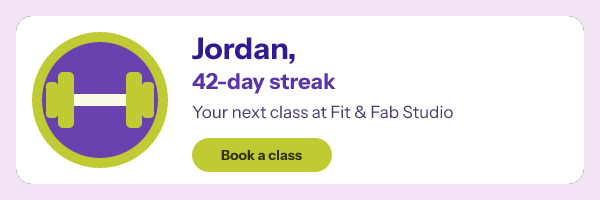
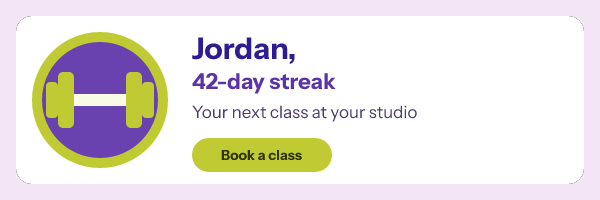
That ampersand is the whole problem. In a link, & starts the next parameter. Through url_escape, Jordan’s studio arrives as “Fit”, followed by a stray piece reading “Fab Studio”. The renderer sees a value followed by something that is not a field, and marks studio damaged. It never draws “Fit”. It draws the field’s fallback, “your studio”, and the rest of the banner carries on.
Braze also lists url_encode, with google search becoming google+search. A + reads as a space here, as the URL Standard’s form decoding says. Braze’s description of url_encode says nothing about &, so use the filter that names it.
The default filter
Braze’s docs are direct about a missing attribute: “If a default value isn’t provided and the field is missing or not set on the user, the field will be blank in the message.” In the image link, blank is what you want. An empty value reaches the renderer as missing, and the fallback you designed for that field takes over. That fallback can be a word, a hidden layer or a hidden group.
So leave default off in the link. If your team adds one anyway, Braze applies filters “from left to right”, so it goes first: {{${first_name} | default: 'there' | url_param_escape}}. That has a cost. The renderer receives “there” as if it were a name, and a design that swaps the whole greeting line for “Keep your streak going” never gets the chance.
Braze adds that “The default value will show for empty values, but not for blank values.” A profile holding only spaces skips Braze’s default. The renderer trims it to nothing and draws your fallback either way.
Where the tag goes in Braze
Paste the snippet into an HTML block in the drag-and-drop editor, or anywhere in the HTML editor. Braze’s editor notes say the same: “use HTML blocks for any Liquid logic”, and “Liquid isn’t supported in image blocks or in button URL fields.” The same page also lists an “Image with Liquid” setting on the Image block, so its two notes disagree. The HTML block works under either reading.
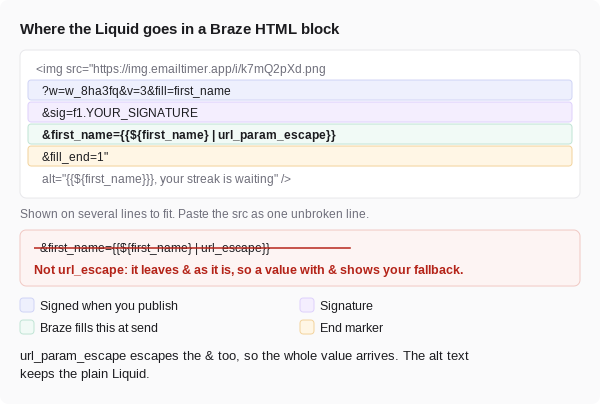
The snippet panel’s “Filled by Braze when it sends” mode writes it in this shape:
<a href="https://stride.example/classes" target="_blank">
  <img src="https://img.emailtimer.app/i/k7mQ2pXd.png?w=w_8ha3fq&v=3&fill=first_name.streak_days.studio&sig=f1.YOUR_SIGNATURE&first_name={{${first_name} | url_param_escape}}&streak_days={{custom_attribute.${streak_days} | url_param_escape}}&studio={{custom_attribute.${home_studio} | url_param_escape}}&fill_end=1" alt="{{${first_name}}}, your streak is waiting" width="600" height="200" border="0" style="display:block;width:100%;max-width:600px;height:auto;border:0;" />
</a>
The alt text and the href keep the bare tag, because they are ordinary text to Braze. If you want Braze’s default in the alt text, write it with straight single quotes, {{${first_name} | default: 'there'}}, which Braze asks for anyway and which cannot close the double-quoted attribute. Anything Braze or a tracker appends after fill_end=1 is ignored.
The countdown side of the same integration, for a banner with a live clock and no fields, is on the Braze countdown timer page.
Four users, rendered
Every picture here is a render from the EmailTimer.app engine, in Stride’s lime and violet on a pale lilac ground. Stride and its studios are invented.
| User | What Braze filled | What the banner says |
|---|---|---|
| Jordan | Jordan, 42, Fit & Fab Studio | “Jordan, 42-day streak” and “Your next class at Fit & Fab Studio” |
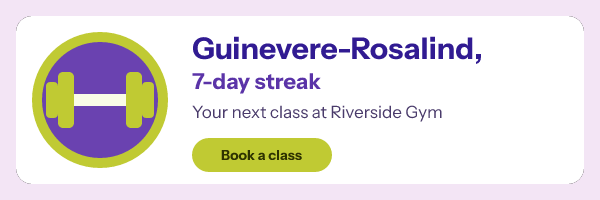
| Guinevere-Rosalind | Guinevere-Rosalind, 7, Riverside Gym | “Guinevere-Rosalind, 7-day streak” and “Your next class at Riverside Gym” |
| A new user with nothing on file | three empty values | “Keep your streak going” and “Your next class at your studio” |
Jordan, sent through url_escape |
the studio split at the & |
“Jordan, 42-day streak” and “Your next class at your studio” |
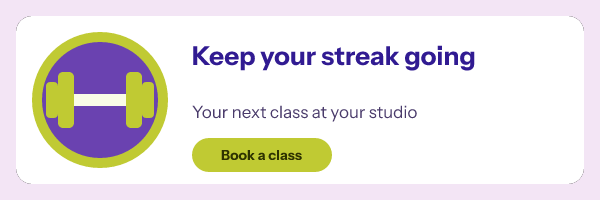
The fields behind the banner: first_name is a Name. streak_days is a Number with a minimum of 0 and a maximum of 3,650, so no edited link can make a copy boast a million days. studio is a Choice whose options are Stride’s studio names, up to 500 of them, so the line can only ever name a real studio. A Text field would take any studio name, and the editor warns that anyone who has the email can change a Text value on their own copy.
Campaigns, Canvas and Connected Content
In a campaign, the attribute tags above are all you need. Braze substitutes them “when the message is sent”, so the banner shows the value Braze had at send. A streak that grows on Tuesday still reads 42 in Monday’s email. Only a countdown moves after the send.
In Canvas, Braze now reads entry properties through context: its docs say “canvas_entry_properties is referenced as context”, and the old form still works. {{context.${class_name} | url_param_escape}} can go in any Message step. Event properties are narrower: Braze allows event_properties in the first Message step after an Action Paths step for a custom event or a purchase.
A Connected Content value can fill a field too. Put the call in the same HTML block, above the image, and save the response:
{% connected_content https://api.stride.example/members/{{${user_id}}}/next-class :save next %}
Then change the studio tag in the pasted snippet to {{next.studio | url_param_escape}}. Braze makes the request while it renders the message, and the value it gets back is drawn as it stood at send. The image service never calls your API and never fetches anything from a link.
A per-user deadline works the same way. Give the template a Date field, tick “This date drives the countdown”, and send Braze’s date as Unix time with its documented date: '%s' filter: {{custom_attribute.${trial_end} | date: '%s' | url_param_escape}}, with the field set to read a 10-digit epoch. A date more than 90 days ahead counts as unusable (you can raise that to 400), and a missing date hides the timer unless you choose the ended state or the template’s own deadline.
One thing a filled link cannot do: every user shares it, so a countdown that starts at first open starts at the first open by anyone. A clock from each user’s own first open needs a link minted per user, on Growth or Agency. Points and tier colours follow the same pattern, shown on loyalty points images.
What a user can change, and what stops abuse
The values after the signature travel inside the email, so anyone holding that email can edit the link on their own copy. What they can do with it is narrow.
- Only the listed fields can change. Touch the signed part and the image comes back blank for everyone.
- Each value has to pass its kind. A Name takes letters plus a few marks such as hyphens and apostrophes, up to four words in one script each, and words such as “verify” and “refund” are refused. A Number stays inside your minimum and maximum. A Choice is one of your options. Anything else draws your fallback.
- Opening the image link in a tab of a current browser, or pasting it where a link preview bot reads it (Slack, WhatsApp, LinkedIn and others), gets the fallbacks.
- Per-IP, render-slot, per-template and daily limits apply. The daily ceiling defaults to 25 percent of the plan’s monthly included opens per UTC day. Past the render slots, the per-template bucket or the daily ceiling, the image shows the fallbacks and the open is not billed.
- “Stop filling fields” on the template page, or for the whole workspace, shows your fallbacks on every open within a minute. Copies already cached elsewhere can keep a filled value for up to a day.
What is left, stated plainly: someone with the email can put a short, letters-only name that is on no list into their own copy and screenshot it. A value in a link can also be seen by whoever holds the email, by Braze, by the recipient’s mail provider and by EmailTimer.app. Field names that look like passwords, tokens or card numbers cannot be made fillable, and no text kind accepts @, so an email address never reaches a picture this way. Data that must stay out of links belongs in a recipient list, on Growth and Agency. The detail is in merge tags in the image link, and the security answers are in the vendor security review.
Test before you send
Start in the editor. Sample contacts render through the production renderer: three rows you edit, plus fixed rows for the longest accepted name, an Arabic name, a Japanese name, nothing on file and a tag left unfilled. Each row gets a line per field, such as “first_name: drawn”. The Japanese row is drawn in full, as it is in any template published from the editor.
Then use Braze’s own tools. Its test messages page describes previewing as a custom user, where you “enter text for various fields available for personalization, such as the user’s first name and any custom attributes.” Make one custom user whose home_studio is “Fit & Fab Studio” and one with no first name, and send each test to your own address from Preview and Test. The user with no first name shows your fallback, which is the fallback working.
Last, copy the image link out of the test email (a Gmail proxy address works too) and paste it into Check a test email in the dashboard. It lists each field, what arrived and what was drawn. After launch, Fill health on the usage screen counts drawn, empty and each fallback reason per field, never the values, and raises a banner when more than 20 percent of a template’s filled opens in the last hour were unfilled tags.
How to set it up
- In the dashboard, create a new design and choose Personalized image, or Personalized image with a countdown if the banner needs a clock.
- Start from a starting design or a blank canvas. Use Upload image to add your own files, set the canvas Background to Image for a photo, and add your logo as an image layer.
- Open the Fields tab and add a field for each value: First name as a Name, Streak days as a Number from 0 to 3,650, Studio as a Choice with your studios as options. Set each fallback, and leave “Your email platform can fill this” ticked.
- Check the sample contacts, especially the long name and the row with nothing on file.
- Publish.
- In the snippet panel, choose Braze and the “Filled by Braze when it sends” mode. In the mapping table, set each field’s Braze attribute:
first_name, then the custom attributesstreak_daysandhome_studio. - Copy the snippet and paste it into an HTML block in the drag-and-drop editor, or into the HTML editor.
- Send yourself a test from Preview and Test, then paste the image link from that email into Check a test email.
- Launch, and watch Fill health for the first hour.
The field rules, the link format and every limit are in the reference for fields your email platform fills. If you are weighing Braze against Iterable, dynamic images in Iterable covers the same job with a Handlebars helper.
Questions and answers
Does Braze have native personalized images?
Braze swaps whole image files per user with Liquid in the image link, looks up images in Catalogs and Product blocks, and generates images for the media library with GPT Image 2.0. Its documentation, read on 26 September 2026, describes none of these drawing a user’s own text into a designed picture. Its partner directory lists outside vendors for that.
Why url_param_escape and not url_escape?
Braze documents url_param_escape as escaping the ampersand and url_escape as not. A raw & inside a value splits it, and the renderer then draws the field’s fallback rather than a cut word. With url_param_escape, “Fit & Fab Studio” arrives whole.
Can a Connected Content value go in the image?
Yes. Save the response with :save, place the call above the image in the same HTML block, and write the field into the link with url_param_escape. The value is the one Braze received at send, and your API is not called again when the email is opened.
Do custom attributes work?
Yes, with Braze’s namespace: {{custom_attribute.${streak_days} | url_param_escape}}. Without custom_attribute. the tag does not reach the attribute. Check a test email shows what arrived for each field, so a wrong tag shows up before the send.
What does a user with no first name see?
Your fallback. Braze leaves a missing attribute blank, a blank value counts as missing, and the template draws whatever you chose for that field, such as the word “there” or a different line altogether. A test send to such a user shows the same thing.
Does the image count against Braze sends?
It adds nothing to what Braze sends. Braze delivers the email with the image link in it, and the picture is fetched from EmailTimer.app when the email is opened. Each fetch counts as an open on your EmailTimer.app plan, as how opens are counted explains, and a filled open where no value could be drawn is not billed.
Sources
- Advanced Liquid filters (Braze Docs), read on 29 September 2026
- Supported personalization tags (Braze Docs), read on 26 September 2026
- Use Liquid (Braze Docs), read on 26 September 2026
- Set default values (Braze Docs), read on 26 September 2026
- Filters (Braze Docs), read on 26 September 2026
- Personalize action and media URLs with Liquid (Braze Docs), read on 26 September 2026
- Make a Connected Content API call (Braze Docs), read on 26 September 2026
- Catalogs (Braze Docs), read on 26 September 2026
- Using catalogs (Braze Docs), read on 26 September 2026
- Generate images (Braze Docs), read on 26 September 2026
- Drag-and-drop editor blocks, email (Braze Docs), read on 26 September 2026
- Context and event properties (Braze Docs), read on 26 September 2026
- Send test messages (Braze Docs), read on 26 September 2026
- Visual and interactive content partner pages (Braze Docs), which list other image vendors, read on 26 September 2026 and cited without a link
- RFC 3986: Uniform Resource Identifier (URI), Generic Syntax
- URL Standard, application/x-www-form-urlencoded parsing (WHATWG)
Related
Put a countdown in the campaign you are writing now
The free plan covers 5,000 opens a month with no card. Starter is $24 a month for 250,000.